Project Hub
/Artificial Intelligence & Edge ML/Object Detection & Tracking/A Tiny AI Wireless Streaming Camera
Advanced
ESP32
Project Specific
3 – 6 Hours
Partial Kit
A Tiny AI Wireless Streaming Camera
A compact, low-power AI wireless streaming camera built using the coin-sized IndusBoard Coin V2 and an OV2640 camera module, paired with browser-based TensorFlow.js object detection.
This project is sourced from another site, not written by us — this list is our best match of their components against what we stock, not a verified bill of materials. Always check the original blog (linked above) for the actual parts list before buying.
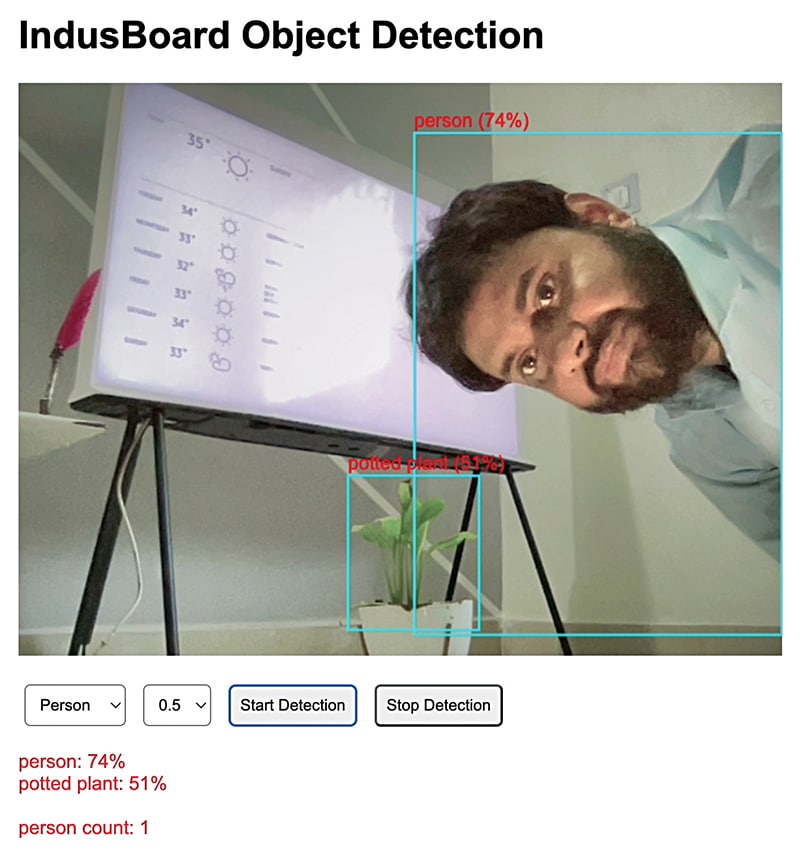
The A Tiny AI Wireless Streaming Camera project operates by integrating computer vision hardware with browser-based machine learning inference. At the core of the system is the IndusBoard Coin V2, powered by an ESP32 microcontroller, which interfaces directly with an OV2640 camera module using a parallel camera interface (SCCB/I2C for control and DVP for image data). When powered via a 3.3V battery or USB adaptor and connected using the micro USB cable and 15 jumper wires, the ESP32 captures raw image frames from the OV2640 sensor. Using its built-in Wi-Fi capabilities, the ESP32 streams these compressed JPEG video frames wirelessly over a local network. On the receiving end, a web browser accesses the video stream and executes the TensorFlow.js framework utilizing the COCO-SSD object detection model. Instead of performing heavy neural network computations on the resource-constrained edge microcontroller itself, the system offloads the deep learning inference to the client browser, which continuously analyzes the incoming video stream to identify, locate, and classify objects in real-time.
Why Build This
Deploy a lightweight, portable edge-AI streaming device suitable for integration into compact robotics, miniature drones, and wearable technology prototypes.
Gain practical experience bridging embedded microcontroller hardware with web-based machine learning pipelines like TensorFlow.js and COCO-SSD.
Design and assemble a low-power, wireless internet-connected vision system applicable to modern home security and remote wildlife monitoring setups.
Real-World Application
Useful for compact applications such as drones, wearable devices, home security, wildlife monitoring, and robotics where size, low power consumption, and real-time visual intelligence are critical.
Skills You'll Learn
Embedded camera interfacing
Wireless video streaming
Edge-to-cloud machine learning integration
Microcontroller power management
Peripheral wiring and prototyping
Safety Precautions
No specific precautions noted for this build — always follow general electronics safety practices.
Technology Tags
AI
MACHINE LEARNING
TENSORFLOW.JS
COCO-SSD
COMPUTER VISION
OV2640
WI-FI STREAMING
EMBEDDED SYSTEMS
Frequently Asked Questions
The ESP32 is a low-power microcontroller lacking the heavy processing power and memory required to run neural network models like COCO-SSD efficiently. Streaming the video to a browser allows TensorFlow.js to leverage the computer or smartphone's GPU for real-time object detection.
Yes, you can use a USB adaptor through the micro USB cable, provided the power supply delivers stable current and the circuit components (like the IndusBoard Coin V2 and OV2640) are properly regulated to their required operating voltages, typically 3.3V.
The jumper wires are used to establish the intricate physical data, control, and power connections between the IndusBoard Coin V2 and the OV2640 camera module, as well as auxiliary power routing.
Gallery
This page is part of Kitkraft's Project Hub — a curated collection of electronics & robotics projects gathered from the maker community to help students and hobbyists discover and learn to build. Kitkraft does not claim authorship of the original project, and makes no representation as to the accuracy, completeness or safety of third-party source material. The summary and "How It Works" explanation above are AI-generated, rewritten with reference to the original tutorial — not a reproduction of it. Full credit and a direct link to the original source are provided above. If you're the original creator and have a concern about how your work is represented here, please contact us and we'll address it promptly.
Kitkraft Project Hub — curated from the maker community, credited at the source.
 ESP32 CAM WiFi Module Bluetooth with OV2640 Camera
Rs. 810.00
 Jumper Wire 10 Pin Male To Male 20cm
Rs. 45.00
 MB102 Adjustable Breadboard Power Supply Module (3.3V & 5V) for Arduino & Raspberry Pi
Rs. 139.00
 Cable for Arduino Nano (USB 2.0 A to USB 2.0 Mini B) 30cm
Rs. 69.00
 400 Points Mini Solderless Prototype PCB Breadboard High Quality
Rs. 89.00
 Jumper Wire 10 Pin Male To Female 20cm
Rs. 45.00


