Learn how to implement AI-based gesture recognition using Edge Impulse and the IndusBoard Coin, training and deploying a machine learning model for real-time motion classification.
This project is sourced from another site, not written by us — this list is our best match of their components against what we stock, not a verified bill of materials. Always check the original blog (linked above) for the actual parts list before buying.
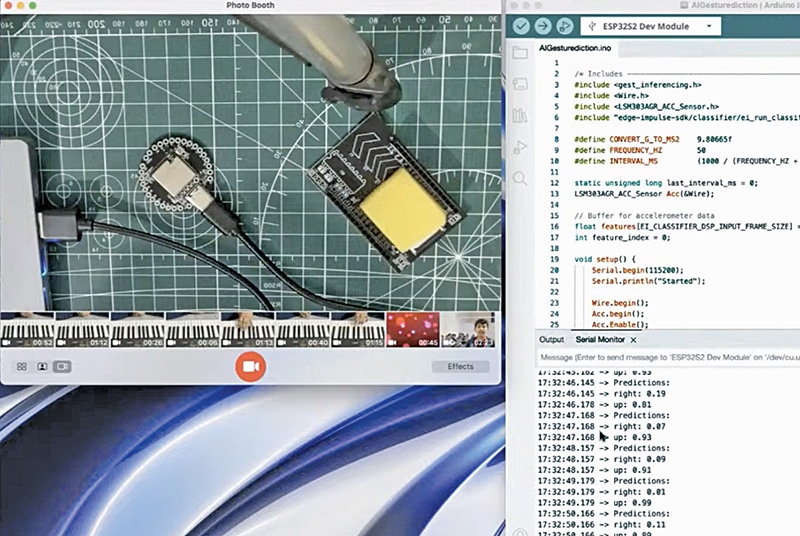
This project implements real-time machine learning directly on a microcontroller using the IndusBoard Coin, combining hardware motion sensing with embedded artificial intelligence. At the core of the system is the IndusBoard Coin connected via a USB C-type cable for power and data transmission. Although the raw sensor integration relies on the board's internal capabilities, the overall workflow bridges embedded systems and cloud-based machine learning. First, motion data corresponding to specific physical movements or gestures is captured using the Edge Impulse CLI and associated software tools. This data acts as the dataset for training a custom neural network model within the Edge Impulse platform. Once trained to recognize distinct movement patterns, the resulting machine learning classifier is compiled into optimized C++ code and deployed directly onto the IndusBoard Coin using the Arduino IDE. During runtime, the board continuously samples physical motion data, feeds it into the onboard model, and performs real-time inference. The system processes these inputs locally at the edge—meaning no cloud connection is required for decision-making—allowing the IndusBoard Coin to instantly classify whether a given gesture matches a trained category such as a wave, tap, or rotation.
Why Build This
Gain practical experience deploying machine learning models onto resource-constrained hardware for wearable tech and fitness tracking applications.
Understand the complete edge AI pipeline, from raw sensor data collection and model training to on-device deployment using industry-standard tools.
Real-World Application
Motion tracking in smartwatches, fitness and exercise-related devices, anomaly detection in machinery, and vehicle predictive analysis.
Skills You'll Learn
Edge ML model deployment
gesture classification
sensor data acquisition
Arduino IDE programming
command-line interface utilization
Safety Precautions
No specific precautions noted for this build — always follow general electronics safety practices.
Technology Tags
ARTIFICIAL INTELLIGENCE
MACHINE LEARNING
EDGE IMPULSE
GESTURE RECOGNITION
MICROCONTROLLERS
EMBEDDED SYSTEMS
SENSORS
ACCELEROMETER
Frequently Asked Questions
No. Once the Edge Impulse model is compiled and uploaded via the Arduino IDE, all machine learning inference runs locally on the IndusBoard Coin in real time without needing internet access.
Node.js serves as the runtime environment required to operate the Edge Impulse CLI tools, allowing your computer to communicate smoothly with the IndusBoard Coin during data collection and model deployment.
You must use a USB C-type cable because the IndusBoard Coin is equipped with a USB Type-C port for power and data communication.
Gallery
This page is part of Kitkraft's Project Hub — a curated collection of electronics & robotics projects gathered from the maker community to help students and hobbyists discover and learn to build. Kitkraft does not claim authorship of the original project, and makes no representation as to the accuracy, completeness or safety of third-party source material. The summary and "How It Works" explanation above are AI-generated, rewritten with reference to the original tutorial — not a reproduction of it. Full credit and a direct link to the original source are provided above. If you're the original creator and have a concern about how your work is represented here, please contact us and we'll address it promptly.
Kitkraft Project Hub — curated from the maker community, credited at the source.
 Cable for Arduino Nano (USB 2.0 A to USB 2.0 Mini B) 30cm
Rs. 69.00
 400 Points Mini Solderless Prototype PCB Breadboard High Quality
Rs. 89.00
 MB102 Adjustable Breadboard Power Supply Module (3.3V & 5V) for Arduino & Raspberry Pi
Rs. 139.00
 Jumper Wire 10 Pin Male To Male 20cm
Rs. 45.00
 Jumper Wire 10 Pin Male To Female 20cm
Rs. 45.00


