AI-Powered Smoking Detection System Using MaixCam and YOLOv5
Project Hub
/Artificial Intelligence & Edge ML/Object Detection & Tracking/AI-Powered Smoking Detection System Using MaixCam and YOLOv5
Advanced
MAIXDUINO
Project Specific
3 – 6 Hours
Partial Kit
AI-Powered Smoking Detection System Using MaixCam and YOLOv5
An automated smoking and cigarette detection system using the MaixCam development board and a custom YOLOv5 model to trigger alarms and capture snapshots.
This project is sourced from another site, not written by us — this list is our best match of their components against what we stock, not a verified bill of materials. Always check the original blog (linked above) for the actual parts list before buying.
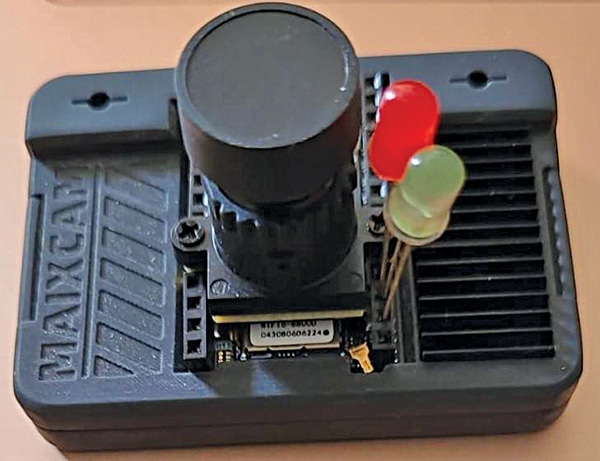
The AI-Powered Smoking Detection System operates as an edge-computing vision platform using the MaixCam development board to run real-time inference without relying on cloud servers. The MaixCam board integrates a specialized neural network accelerator capable of executing a lightweight custom YOLOv5 model, which has been compiled specifically for edge devices (such as a smoking.cvimodel file). When the system boots up, it runs a custom Linux operating system environment executing Python 3.11 scripts to manage the camera feed and inference loop. The camera captures continuous high-resolution frames of the monitored environment. Each frame is passed directly into the quantized YOLOv5 object detection model loaded in memory. The model evaluates the visual data to identify patterns, shapes, and contexts characteristic of cigarettes and active smoking behavior. If the detection confidence exceeds a pre-configured threshold, the system triggers local hardware responses using its general-purpose input/output (GPIO) pins. Specifically, it can light up indicator LEDs to show system status or detections, and drive a buzzer to sound an immediate audible alarm. Additionally, the system captures snapshot images of the violation for evidentiary or logging purposes. Powered by a stable 5V power adaptor, the entire standalone setup continuously monitors enclosed areas like office cabins or public restrooms, processing video streams locally and reacting instantaneously to detected infractions.
Why Build This
Deploy automated smoke-detection solutions in non-smoking areas such as office cabins, industrial zones, and public restrooms without manual monitoring.
Gain practical experience implementing customized lightweight computer vision models (like YOLOv5) on resource-constrained edge AI hardware like MaixCam.
Interface hardware actuators like buzzers and LEDs with an advanced vision development board running Python to create responsive real-world security systems.
Real-World Application
Enforcing smoking bans in public restrooms, office cabins, parks, and industrial zones.
Skills You'll Learn
Edge AI deployment
YOLOv5 model quantization and inference
Python-based hardware interfacing
computer vision object detection
Linux OS configuration for embedded systems
GPIO control for alarms and indicators
Safety Precautions
No specific precautions noted for this build — always follow general electronics safety practices.
Technology Tags
AI
MACHINE LEARNING
EDGE AI
YOLOV5
PYTHON
IMAGE PROCESSING
COMPUTER VISION
EMBEDDED SYSTEMS
LINUX
Frequently Asked Questions
No, the entire object detection process runs locally on the MaixCam board using an edge-optimized YOLOv5 model, requiring no cloud connection.
Yes, by training a custom YOLOv5 model on a new dataset and compiling it into the format required by the MaixCam board, you can detect various other objects.
A reliable 5V power adaptor capable of delivering adequate current for the development board, LEDs, and buzzer should be used to prevent unexpected reboots during operation.
Gallery
This page is part of Kitkraft's Project Hub — a curated collection of electronics & robotics projects gathered from the maker community to help students and hobbyists discover and learn to build. Kitkraft does not claim authorship of the original project, and makes no representation as to the accuracy, completeness or safety of third-party source material. The summary and "How It Works" explanation above are AI-generated, rewritten with reference to the original tutorial — not a reproduction of it. Full credit and a direct link to the original source are provided above. If you're the original creator and have a concern about how your work is represented here, please contact us and we'll address it promptly.
Kitkraft Project Hub — curated from the maker community, credited at the source.
 MB102 Adjustable Breadboard Power Supply Module (3.3V & 5V) for Arduino & Raspberry Pi
Rs. 139.00
 10pcs 5mm RED Diffused Light Emitting Diodes - LEDs Set
Rs. 39.00
 Piezo Buzzer (Big) 6-12V
Rs. 45.00
 400 Points Mini Solderless Prototype PCB Breadboard High Quality
Rs. 89.00
 Jumper Wire 10 Pin Male To Male 20cm
Rs. 45.00
 Jumper Wire 10 Pin Male To Female 20cm
Rs. 45.00


