Project Hub
/IoT & Connected Devices/Air Quality Monitoring/AIR-Buddy - A Buddy for Monitor Air Quality
Intermediate
ESP32
Project Specific
3 – 6 Hours
Partial Kit
AIR-Buddy - A Buddy for Monitor Air Quality
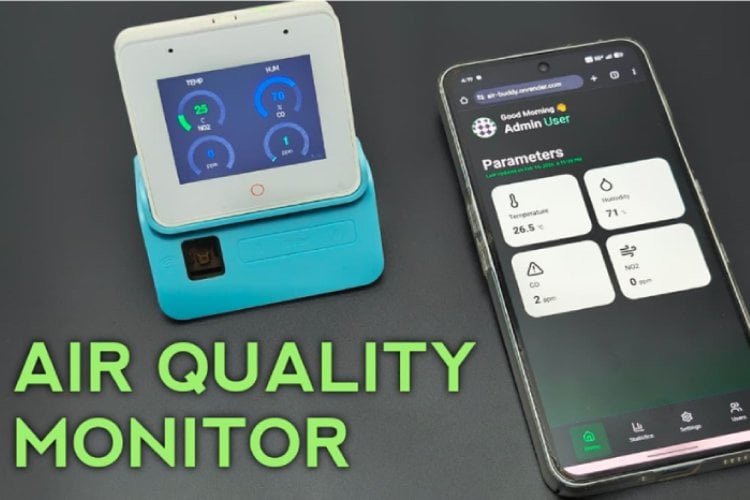
AIR-Buddy is a real-time smart air quality monitoring device built using the ESP32-S3 Box to detect harmful gases like CO and NO₂ for child health protection.
This project is sourced from another site, not written by us — this list is our best match of their components against what we stock, not a verified bill of materials. Always check the original blog (linked above) for the actual parts list before buying.
The AIR-Buddy system is designed to monitor indoor air quality and protect health by detecting harmful gases using a microcontroller-based setup. At the heart of the project is the ESP32 microcontroller, mounted on an ESP32-S3-BOX-3 platform and powered by a rechargeable 3.7V 18650 battery. Connected to the system are specialized MEMS gas detection sensors, specifically chosen to sense carbon monoxide (CO) and nitrogen dioxide (NO₂) in the surrounding environment. These sensors continuously sample the air and output electrical signals that the ESP32 can measure and process. The ESP32 runs software programmed via the Arduino IDE, utilizing specific libraries to handle networking and data management. Through its built-in Wi-Fi capabilities, the ESP32 can connect to a local wireless network. It hosts a local web server using an asynchronous web server library, allowing users to view real-time air quality metrics directly through a browser interface. The software also utilizes LittleFS for internal file storage and the ArduinoJson library to format data efficiently. If the MEMS sensors detect rising levels of hazardous gases like CO or NO₂ that exceed safe thresholds, the system can trigger alerts. Everything is neatly housed inside a custom 3D printed enclosure, with initial prototyping and circuit connections assembled using a breadboard before final assembly.
Why Build This
Learn how to build a smart, connected environmental monitor to track invisible pollutants like carbon monoxide in your home or classroom.
Gain hands-on experience combining Wi-Fi microcontrollers with gas sensors to create IoT devices that protect health and safety.
Design and assemble a complete standalone electronic gadget, complete with a custom 3D printed case and a rechargeable battery power supply.
Real-World Application
Deploying in homes, schools, and workplaces to monitor air pollution levels and alert families or teachers when hazardous gases like carbon monoxide or nitrogen dioxide exceed safe limits.
Skills You'll Learn
Microcontroller programming
Wi-Fi networking configuration
sensor data reading
local web server hosting
power management with lithium batteries
basic circuit assembly
Safety Precautions
Ensure proper ventilation and correct wiring when handling electrical components and 18650 lithium batteries to avoid short circuits.
Technology Tags
ESP32-S3
MEMS SENSORS
CARBON MONOXIDE
NITROGEN DIOXIDE
WI-FI
ARDUINO IDE
IOT
3D PRINTING
Frequently Asked Questions
The 3.7V 18650 battery provides portable power to the ESP32 and sensors, allowing the air quality monitor to operate without being permanently plugged into a wall outlet.
No, the ESP32 can host a local web server and use a local network setup so you can view air quality data directly on your devices without requiring external cloud services.
MEMS gas sensors are specifically engineered to react chemically to trace amounts of gases like CO and NO₂, changing their electrical properties so the microcontroller can measure pollution levels.
Gallery
This page is part of Kitkraft's Project Hub — a curated collection of electronics & robotics projects gathered from the maker community to help students and hobbyists discover and learn to build. Kitkraft does not claim authorship of the original project, and makes no representation as to the accuracy, completeness or safety of third-party source material. The summary and "How It Works" explanation above are AI-generated, rewritten with reference to the original tutorial — not a reproduction of it. Full credit and a direct link to the original source are provided above. If you're the original creator and have a concern about how your work is represented here, please contact us and we'll address it promptly.
Kitkraft Project Hub — curated from the maker community, credited at the source.
 ESP32-C3 Development Board with Berg Pins - Unsoldered
Rs. 390.00
 1200mAh 18650 Li-ion Bat – Reliable 3.7V Power Cell
Rs. 129.00
 MB102 Adjustable Breadboard Power Supply Module (3.3V & 5V) for Arduino & Raspberry Pi
Rs. 139.00
 400 Points Mini Solderless Prototype PCB Breadboard High Quality
Rs. 89.00
 Jumper Wire 10 Pin Male To Male 20cm
Rs. 45.00
 Jumper Wire 10 Pin Male To Female 20cm
Rs. 45.00


