This project is sourced from another site, not written by us — this list is our best match of their components against what we stock, not a verified bill of materials. Always check the original blog (linked above) for the actual parts list before buying.
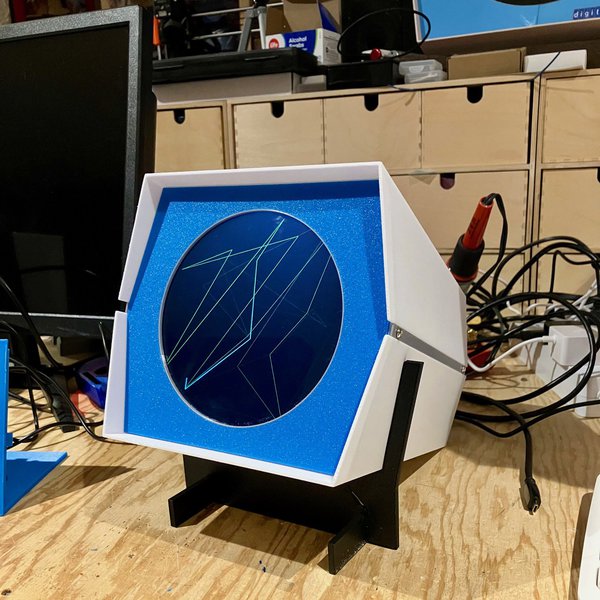
This project recreates a classic vintage display by utilizing a modern single-board computer and a high-resolution circular screen mounted inside a custom 3D printed enclosure. At the heart of the system is a Raspberry Pi 5, which acts as the primary processing and video output unit. Instead of generating traditional square desktop outputs, the system drives a Waveshare 5-inch HDMI circular touch display with a sharp 1080x1080 resolution, connected directly via a 90-degree HDMI adapter to ensure a compact and clean internal layout. The display receives power and video signals directly from the Raspberry Pi, mimicking the visual aesthetic of historical round cathode-ray tube (CRT) displays at a precise 36% scale. Mechanically, the hardware is secured using a combination of M3 x 10 mm and M4 x 10 mm bolts, holding together the custom 3D printed case components, which include a front panel, back panel, simple stand, wire holder, and other accessories. Because the display is touch-capable and features a high-pixel-density round panel, it can accurately render vintage vector graphics and interactive oscilloscope-style elements reminiscent of early computing hardware, perfectly complementing retrocomputing setups like a PiDP-1 replica.
Why Build This
Build a historically accurate, scaled-down replica of a classic DEC Type 30 CRT display for retrocomputing exhibits or home museum displays.
Complement a PiDP-1 replica system with an authentic-looking visual output device using modern single-board computer technology.
Gain hands-on experience in assembling complex 3D-printed electronics enclosures and working with high-resolution specialized display hardware.
Real-World Application
Historical computing exhibits, retrocomputing home setups, museum replicas, and educational displays.
Skills You'll Learn
3D printed hardware assembly
single-board computer setup
HDMI display configuration
mechanical fastener integration
cable management and routing
Safety Precautions
Exercise care when handling small electronic components and self-tapping screws during assembly.
Technology Tags
3D PRINTING
CAD
FUSION 360
RETROCOMPUTING
CRT DISPLAY
DEC PDP-1
Frequently Asked Questions
The project uses a Waveshare 5-inch HDMI circular touch display with a resolution of 1080x1080 pixels.
The project is specifically designed around the Raspberry Pi 5, though physical mounting and HDMI connections may vary if using alternative single-board computer form factors.
No software requirements are explicitly listed in the project data, but utilizing a circular 1080x1080 display typically involves adjusting the operating system's video output configuration to match the non-standard aspect ratio.
Gallery
This page is part of Kitkraft's Project Hub — a curated collection of electronics & robotics projects gathered from the maker community to help students and hobbyists discover and learn to build. Kitkraft does not claim authorship of the original project, and makes no representation as to the accuracy, completeness or safety of third-party source material. The summary and "How It Works" explanation above are AI-generated, rewritten with reference to the original tutorial — not a reproduction of it. Full credit and a direct link to the original source are provided above. If you're the original creator and have a concern about how your work is represented here, please contact us and we'll address it promptly.
Kitkraft Project Hub — curated from the maker community, credited at the source.
 MB102 Adjustable Breadboard Power Supply Module (3.3V & 5V) for Arduino & Raspberry Pi
Rs. 139.00
 400 Points Mini Solderless Prototype PCB Breadboard High Quality
Rs. 89.00
 Jumper Wire 10 Pin Male To Male 20cm
Rs. 45.00
 Jumper Wire 10 Pin Male To Female 20cm
Rs. 45.00


