Project Hub
/Automotive EV & Transportation/Telematics & OBD-II/Arduino Uno R4 WiFi: 32-Bit ARM & Renesas
Beginner
ARDUINO
₹1,500 – ₹5,000
3 – 6 Hours
Partial Kit
Arduino Uno R4 WiFi: 32-Bit ARM & Renesas
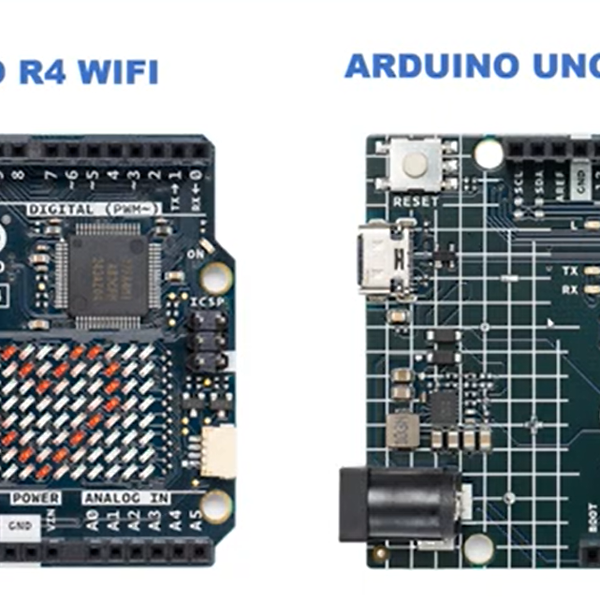
An exploration and technical breakdown of the Arduino Uno R4 WiFi featuring the Renesas RA4M1 32-bit ARM Cortex-M4 microcontroller and ESP32-S3 wireless co-processor.
This project is sourced from another site, not written by us — this list is our best match of their components against what we stock, not a verified bill of materials. Always check the original blog (linked above) for the actual parts list before buying.
The Arduino Uno R4 WiFi system operates around a powerful dual-processor architecture designed to handle both intensive local computation and wireless communication. At the heart of the board is the Renesas RA4M1 microcontroller, a 32-bit ARM Cortex-M4 processor responsible for executing your primary control logic, reading sensor data, and managing physical inputs and outputs. Connected to this main processor is an ESP32-S3 wireless co-processor, which offloads the heavy lifting required for Wi-Fi and Bluetooth connectivity. When you develop a project using this hardware, you write and upload your code via a USB-C cable from a computer running the Arduino IDE v2.0 or above. The computer compiles the sketch using the Arduino Uno R4 Boards package and transfers the binary code to the board's flash memory. Once powered, the Renesas MCU can process real-time tasks locally while communicating commands or sharing telemetry data wirelessly through the ESP32-S3 co-processor. This division of labor allows the system to bridge physical computing environments with cloud networks, making it capable of gathering inputs, running local algorithms, and transmitting information over a local network or the internet without sacrificing processing speed.
Why Build This
Develop advanced IoT and telematics prototypes that require both high-speed 32-bit local processing and integrated wireless communication.
Learn to interface modern microcontroller architectures with auxiliary wireless co-processors for industrial and vehicular monitoring.
Gain practical experience deploying modern development environments like the Arduino IDE v2.0 for 32-bit ARM hardware.
Real-World Application
IoT devices, wireless sensor nodes, industrial automation, and interactive electronics prototypes requiring advanced processing and connectivity.
Skills You'll Learn
32-bit microcontroller programming
dual-processor architecture management
wireless co-processor integration
IDE environment configuration
serial communication via USB-C
Safety Precautions
No specific precautions noted for this build — always follow general electronics safety practices.
Technology Tags
ARDUINO
ARM CORTEX-M4
RENESAS RA4M1
ESP32-S3
WI-FI
BLUETOOTH
LED MATRIX
C++
EMBEDDED SYSTEMS
Frequently Asked Questions
Typically, modern operating systems recognize the board automatically when connected via a USB-C cable, but you must ensure you have installed the correct Arduino Uno R4 Boards package inside the Arduino IDE v2.0 or above to compile and upload code properly.
The Renesas RA4M1 handles your primary application logic and general input/output tasks with high 32-bit performance, while the ESP32-S3 is dedicated specifically to managing Wi-Fi and Bluetooth stacks, preventing wireless tasks from slowing down your main program.
It is strongly recommended to use Arduino IDE v2.0 or higher, as older legacy versions lack full compatibility and support for the specific toolchains required by the Renesas and ESP32-S3 architecture on the Uno R4 WiFi.
Gallery
This page is part of Kitkraft's Project Hub — a curated collection of electronics & robotics projects gathered from the maker community to help students and hobbyists discover and learn to build. Kitkraft does not claim authorship of the original project, and makes no representation as to the accuracy, completeness or safety of third-party source material. The summary and "How It Works" explanation above are AI-generated, rewritten with reference to the original tutorial — not a reproduction of it. Full credit and a direct link to the original source are provided above. If you're the original creator and have a concern about how your work is represented here, please contact us and we'll address it promptly.
Kitkraft Project Hub — curated from the maker community, credited at the source.
 Cable for Arduino Nano (USB 2.0 A to USB 2.0 Mini B) 30cm
Rs. 69.00
 400 Points Mini Solderless Prototype PCB Breadboard High Quality
Rs. 89.00
 MB102 Adjustable Breadboard Power Supply Module (3.3V & 5V) for Arduino & Raspberry Pi
Rs. 139.00
 Jumper Wire 10 Pin Male To Male 20cm
Rs. 45.00
 Jumper Wire 10 Pin Male To Female 20cm
Rs. 45.00


