This project is sourced from another site, not written by us — this list is our best match of their components against what we stock, not a verified bill of materials. Always check the original blog (linked above) for the actual parts list before buying.
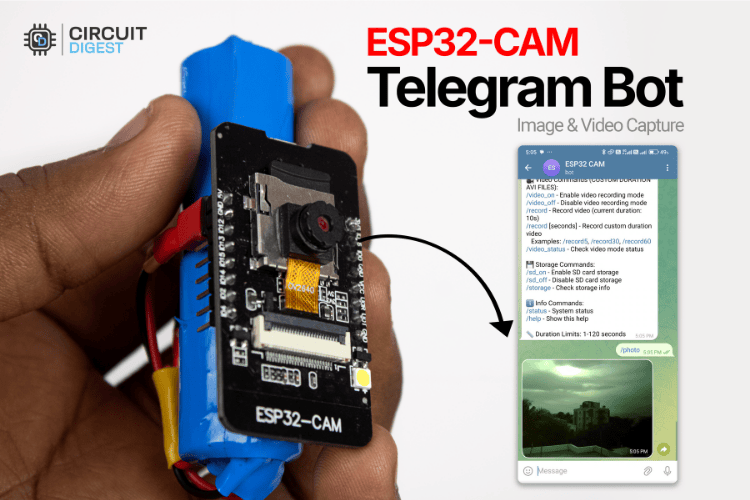
The ESP32-CAM Telegram Bot system operates by combining a micro-controller with image-sensing hardware, wireless networking capabilities, and cloud messaging. At the heart of the system is the ESP32-CAM module, which integrates an OV2640 camera sensor, onboard flash memory, and an ESP32 chip featuring built-in Wi-Fi and Bluetooth. When powered via a stable 5V power supply, the ESP32 connects to your local wireless network using the standard WiFi library. The system runs firmware compiled through the Arduino IDE, utilizing the esp_camera library to interface directly with the camera sensor for capturing still images and recording video files. For video storage, an optional MicroSD card can be inserted directly into the module's onboard slot. The UniversalTelegramBot library allows the microcontroller to communicate with the Telegram bot API over the internet. When you send a specific text command from your smartphone to the Telegram bot, the ESP32-CAM receives the message, triggers the camera module to capture a photo or record video data, and then transmits the media file back to your Telegram chat interface over the Wi-Fi connection. Because wireless transmission and camera activation draw significant electrical current, an external antenna can be attached to improve signal reception, and a robust 5V power source is critical to prevent voltage drops and system reboots during operation.
Why Build This
Deploy a low-cost IoT surveillance and home security system that sends real-time alerts and captures directly to your smartphone.
Set up automated property monitoring or remote wildlife observation nodes that operate wirelessly over standard Wi-Fi networks.
Gain practical experience integrating microcontroller peripherals, camera sensors, and cloud-based messaging APIs for remote automation.
Real-World Application
Home security systems, remote wildlife observation, automated property monitoring, and low-cost IoT surveillance.
Skills You'll Learn
Microcontroller programming
Wi-Fi module configuration
camera sensor interfacing
API integration
cloud messaging setup
power management for IoT devices
Safety Precautions
Ensure a stable 5V power supply to avoid brownout issues during Wi-Fi transmission and camera operation.
Technology Tags
ESP32
ESP32-CAM
TELEGRAM BOT
WI-FI
IOT
CAMERA
C++
ARDUINO
SURVEILLANCE
WIRELESS MONITORING
Frequently Asked Questions
This is typically caused by a brownout issue. Taking photos and transmitting data over Wi-Fi demand a surge of electrical current, so you must ensure your 5V power supply is stable and capable of delivering sufficient current.
A MicroSD card is optional for capturing and sending single static images directly through Telegram, but it is recommended if you want to save or record video files locally on the device.
You will need to use a USB Programming Cable or a separate USB-to-TTL converter wired to the appropriate pins (such as TX, RX, and Ground) to upload code from the Arduino IDE.
Gallery
This page is part of Kitkraft's Project Hub — a curated collection of electronics & robotics projects gathered from the maker community to help students and hobbyists discover and learn to build. Kitkraft does not claim authorship of the original project, and makes no representation as to the accuracy, completeness or safety of third-party source material. The summary and "How It Works" explanation above are AI-generated, rewritten with reference to the original tutorial — not a reproduction of it. Full credit and a direct link to the original source are provided above. If you're the original creator and have a concern about how your work is represented here, please contact us and we'll address it promptly.
Kitkraft Project Hub — curated from the maker community, credited at the source.
 ESP32 CAM WiFi Module Bluetooth with OV2640 Camera
Rs. 810.00
 Cable for Arduino Nano (USB 2.0 A to USB 2.0 Mini B) 30cm
Rs. 69.00
 MB102 Adjustable Breadboard Power Supply Module (3.3V & 5V) for Arduino & Raspberry Pi
Rs. 139.00
 400 Points Mini Solderless Prototype PCB Breadboard High Quality
Rs. 89.00
 Jumper Wire 10 Pin Male To Male 20cm
Rs. 45.00
 Jumper Wire 10 Pin Male To Female 20cm
Rs. 45.00


