Control Multiple AC Appliances Wirelessly with Web Interface
Project Hub
/Audio Displays & Interactive Media/LED Matrix & Cube Displays/Control Multiple AC Appliances Wirelessly with Web Interface
Intermediate
ESP32
Project Specific
3 – 6 Hours
Partial Kit
Control Multiple AC Appliances Wirelessly with Web Interface
A smart home automation system built around the IndusBoard Coin that allows users to wirelessly control multiple AC appliances and adjust fan speeds through an interactive web interface.
This project is sourced from another site, not written by us — this list is our best match of their components against what we stock, not a verified bill of materials. Always check the original blog (linked above) for the actual parts list before buying.
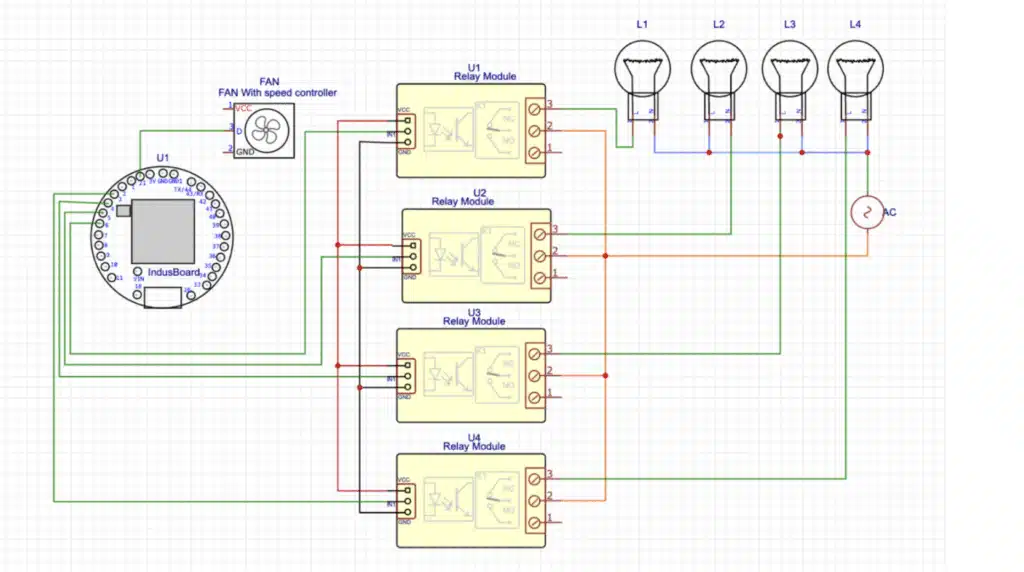
This smart home automation project centers around the IndusBoard Coin, an ESP32-S2 microcontroller board equipped with built-in Wi-Fi capabilities. To allow interaction without external cloud dependencies, the ESP32-S2 hosts a lightweight embedded web server directly on its local network. When a user connects to this server via a smartphone or computer web browser, they can access a graphical user interface featuring interactive buttons and controls. Interacting with the interface sends HTTP requests back to the microcontroller. The IndusBoard Coin processes these incoming network commands and alters its general-purpose digital output pins accordingly. These low-voltage output signals are used to drive external hardware: a 5V DC adapter powers the active logic, a 1-channel relay module acts as an electronic switch to open or close the high-voltage circuit for standard AC appliances like lights, and a specialized 250V AC fan speed controller module receives control inputs to adjust motor speeds. By translating Wi-Fi packets into physical switching actions and control signals, the system bridges the gap between modern wireless devices and traditional high-voltage electrical infrastructure safely and locally.
Why Build This
Design and deploy an independent local web server on an ESP32-S2 microcontroller for wireless appliance management without relying on external cloud infrastructure.
Integrate low-voltage microcontroller logic safely with high-voltage AC circuits using relays and specialized motor controllers suitable for undergraduate engineering demonstrations.
Build a practical, scalable prototype for a smart home automation system that can be expanded to control multiple household loads from any local smartphone or computer.
Real-World Application
Smart home automation for wirelessly controlling lights, fans, and electrical appliances via smartphones or computers without internet dependence.
Skills You'll Learn
Embedded web server development
Wi-Fi network configuration on microcontrollers
relay interfacing and high-voltage load switching
microcontroller digital output control
local network HTTP request handling
Safety Precautions
Working with 250V AC mains electricity carries a risk of electric shock. Exercise extreme caution, ensure power is disconnected before wiring, and properly insulate all high-voltage connections.
Technology Tags
ESP32
WI-FI
IOT
HOME AUTOMATION
WEB SERVER
PWM
RELAY
HTML
JAVASCRIPT
Frequently Asked Questions
As designed, the embedded web server runs locally on the ESP32-S2's Wi-Fi network, meaning it operates entirely offline without internet dependence for local security and reliability.
The IndusBoard Coin is typically powered via its USB connection or a compatible regulated DC source, while the relay and fan modules interface with their own appropriate power supply considerations.
Yes, you will need the Arduino IDE or a standard ESP32 development environment installed on your computer to write, compile, and flash the embedded web server code onto the IndusBoard Coin.
Gallery
This page is part of Kitkraft's Project Hub — a curated collection of electronics & robotics projects gathered from the maker community to help students and hobbyists discover and learn to build. Kitkraft does not claim authorship of the original project, and makes no representation as to the accuracy, completeness or safety of third-party source material. The summary and "How It Works" explanation above are AI-generated, rewritten with reference to the original tutorial — not a reproduction of it. Full credit and a direct link to the original source are provided above. If you're the original creator and have a concern about how your work is represented here, please contact us and we'll address it promptly.
Kitkraft Project Hub — curated from the maker community, credited at the source.
 5V 1 Channel Relay Module
Rs. 45.00
 DC Motor Plastic Fan Blade
Rs. 19.00
 MB102 Adjustable Breadboard Power Supply Module (3.3V & 5V) for Arduino & Raspberry Pi
Rs. 139.00
 Jumper Wire 10 Pin Male To Male 20cm
Rs. 45.00
 400 Points Mini Solderless Prototype PCB Breadboard High Quality
Rs. 89.00
 Jumper Wire 10 Pin Male To Female 20cm
Rs. 45.00


