Custom AI-enabled Home Automation using ESP RainMaker
Project Hub
/Audio Displays & Interactive Media/LED Matrix & Cube Displays/Custom AI-enabled Home Automation using ESP RainMaker
Intermediate
INDUSBOARD
Project Specific
3 – 6 Hours
Partial Kit
Custom AI-enabled Home Automation using ESP RainMaker
Build a custom AI-enabled smart home automation system using the IndusBoard Coin and ESP RainMaker platform, supporting voice control via Alexa, Google Assistant, and Apple Home.
This project is sourced from another site, not written by us — this list is our best match of their components against what we stock, not a verified bill of materials. Always check the original blog (linked above) for the actual parts list before buying.
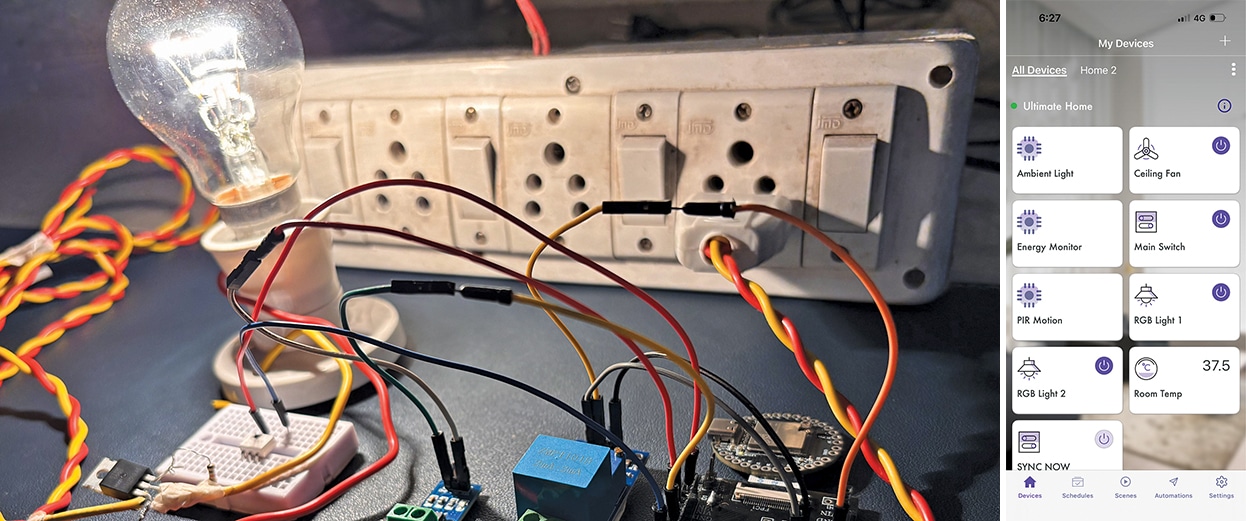
This project creates a custom smart home automation system by integrating the IndusBoard Coin microcontroller with various output peripherals and cloud connectivity. The system relies on the ESP RainMaker platform to bridge your hardware with major smart home ecosystems like Alexa, Google Assistant, and Apple Home, allowing you to control devices using your smartphone or voice commands. At the heart of the setup, the IndusBoard Coin connects via Wi-Fi to receive commands from the cloud. For power management, a 3.3V AC-DC power module safely converts household mains electricity to supply steady, low-voltage direct current to the microcontroller and its logic circuits. To control high-power home appliances, three relay modules (RL1-RL3) act as electronically operated switches, enabling the low-voltage microcontroller to toggle heavier loads on and off safely. A dedicated fan speed controller module (F1) handles variable motor adjustments, while two NeoPixel LED lights (L1 and L2) provide addressable, customizable illumination effects through single-wire data signals sent from the IndusBoard Coin. When you issue a voice command or tap your mobile app, the ESP RainMaker cloud processes the instruction and transmits it over Wi-Fi to the board. The microcontroller then triggers the appropriate hardware—activating a relay for an appliance, adjusting the fan speed module, or changing the color patterns of the NeoPixel LEDs.
Why Build This
Gain hands-on experience bridging physical electronics with modern cloud platforms and smart assistants like Alexa and Google Home.
Build a practical, customizable home automation system to control real-world appliances, fans, and addressable lighting.
Develop advanced high school engineering skills by combining low-voltage digital microcontrollers with mains-voltage relay switching.
Real-World Application
Smart residential and commercial automation for controlling lights, fans, and appliances via unified mobile applications and voice assistants.
Skills You'll Learn
Wi-Fi microcontroller configuration
cloud IoT platform integration
relay switching logic
PWM fan speed control
addressable LED data protocols
low-voltage power supply integration
Safety Precautions
Exercise caution when working with AC-DC power modules and relay-controlled mains voltage circuits to avoid electrical shock.
Technology Tags
ESP RAINMAKER
INDUSBOARD COIN
IOT
HOME AUTOMATION
ALEXA
GOOGLE ASSISTANT
APPLE HOME
WI-FI
RELAYS
NEOPIXEL LEDS
VOICE CONTROL
Frequently Asked Questions
Yes, while the project is designed around the ESP RainMaker platform for voice and app control, the core hardware can be locally programmed and triggered using the IndusBoard Coin.
The 3.3V AC-DC power module steps down mains voltage to power the core electronics, but you should ensure your power setup can adequately handle the combined current draw of the microcontroller, relays, and active NeoPixel LEDs.
Yes, you will need familiarity with the Arduino IDE or custom ESP RainMaker firmware setup to configure your Wi-Fi credentials and map your virtual smart home devices to the physical pins on the IndusBoard Coin.
Gallery
This page is part of Kitkraft's Project Hub — a curated collection of electronics & robotics projects gathered from the maker community to help students and hobbyists discover and learn to build. Kitkraft does not claim authorship of the original project, and makes no representation as to the accuracy, completeness or safety of third-party source material. The summary and "How It Works" explanation above are AI-generated, rewritten with reference to the original tutorial — not a reproduction of it. Full credit and a direct link to the original source are provided above. If you're the original creator and have a concern about how your work is represented here, please contact us and we'll address it promptly.
Kitkraft Project Hub — curated from the maker community, credited at the source.
 5V 1 Channel Relay Module
Rs. 45.00
 DC Motor Plastic Fan Blade
Rs. 19.00
 10pcs 5mm RED Diffused Light Emitting Diodes - LEDs Set
Rs. 39.00
 MB102 Adjustable Breadboard Power Supply Module (3.3V & 5V) for Arduino & Raspberry Pi
Rs. 139.00
 400 Points Mini Solderless Prototype PCB Breadboard High Quality
Rs. 89.00
 Jumper Wire 10 Pin Male To Male 20cm
Rs. 45.00
 Jumper Wire 10 Pin Male To Female 20cm
Rs. 45.00


