Project Hub
/Basic Analog & Power Electronics/Power Supplies & Voltage Regulators/DIY Satellite Tracker Watch - Code and Circuit
Intermediate
INDUSBOARD
Project Specific
3 – 6 Hours
Partial Kit
DIY Satellite Tracker Watch - Code and Circuit
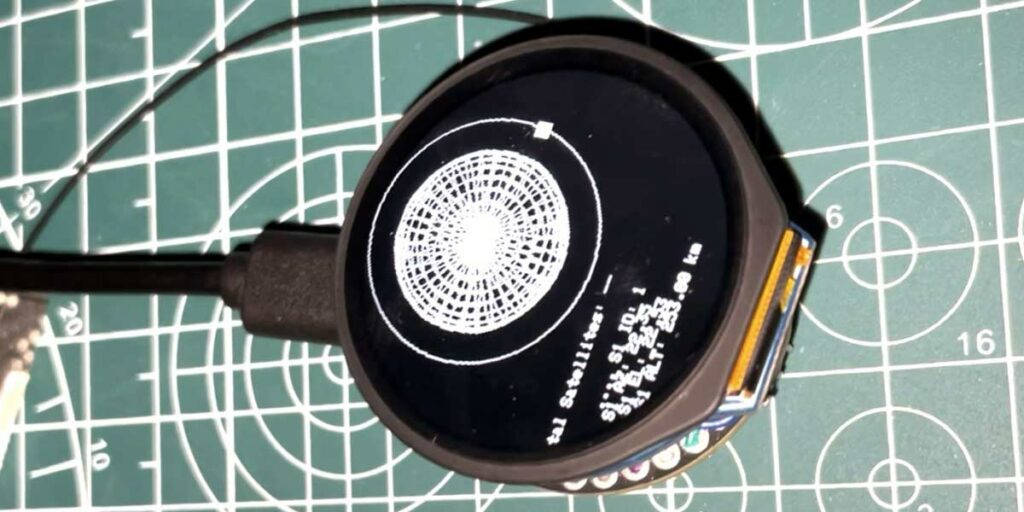
A DIY satellite tracking watch powered by an IndusBoard Coin and a GPS module that displays real-time satellite information on a compact round LCD screen.
This project is sourced from another site, not written by us — this list is our best match of their components against what we stock, not a verified bill of materials. Always check the original blog (linked above) for the actual parts list before buying.
The DIY Satellite Tracker Watch functions as a portable, self-contained navigation and display node powered by a 3.3V battery and managed via a USB-C cable for testing and power. At the heart of the system is the IndusBoard Coin, an ESP32S2-based microcontroller that acts as the central processing unit, executing custom C++ code written through the Arduino IDE. The microcontroller interfaces directly with the L89 GPS Module to continuously acquire precise geospatial data, calculating real-time satellite positions and orbital telemetry. Once the GPS coordinates and satellite data are processed by the TinyGPS library, the IndusBoard Coin formats the information and drives the SPI Round LCD Display. The TFT_eSPI Library handles the graphics rendering on the circular screen, presenting the user with real-time tracking data and visual interfaces. Touch support integrated into the round LCD allows the user to interact with the watch interface directly, navigating through different menus and satellite tracking modes while the 3.3V battery provides untethered mobility for field testing and outdoor use.
Why Build This
Develop hands-on engineering experience with embedded Global Positioning System (GPS) data parsing and orbital tracking concepts suitable for undergraduate space navigation studies.
Gain practical skills in integrating SPI-based round touchscreen displays with microcontroller platforms using specialized graphics libraries.
Build a functional, portable wearable device combining power management, wireless module interfacing, and real-time data visualization.
Real-World Application
Educational tools for learning about space navigation and satellite orbits, amateur radio tracking of communication satellites, astronomy observation planning for the ISS and scientific satellites, and verification of precise location data.
Skills You'll Learn
GPS data parsing
SPI communication protocol
embedded graphics rendering
touchscreen controller integration
battery power management
microcontroller firmware development
Safety Precautions
No specific precautions noted for this build — always follow general electronics safety practices.
Technology Tags
GPS
SPI
USART
C++
ARDUINO IDE
TFT DISPLAY
WEARABLE TECHNOLOGY
SATELLITE TRACKING
Frequently Asked Questions
Yes, the project utilizes the Arduino IDE, which is widely used for programming ESP32S2-based boards like the IndusBoard Coin.
The onboard L89 GPS Module receives signals directly from navigation satellites in orbit to compute position, velocity, and time data locally on the device.
You will need the TFT_eSPI Library to drive the SPI Round LCD Display with touch support, and the TinyGPS Library to decode the NMEA sentences from the L89 GPS module.
Gallery
This page is part of Kitkraft's Project Hub — a curated collection of electronics & robotics projects gathered from the maker community to help students and hobbyists discover and learn to build. Kitkraft does not claim authorship of the original project, and makes no representation as to the accuracy, completeness or safety of third-party source material. The summary and "How It Works" explanation above are AI-generated, rewritten with reference to the original tutorial — not a reproduction of it. Full credit and a direct link to the original source are provided above. If you're the original creator and have a concern about how your work is represented here, please contact us and we'll address it promptly.
Kitkraft Project Hub — curated from the maker community, credited at the source.
 Cable for Arduino Nano (USB 2.0 A to USB 2.0 Mini B) 30cm
Rs. 69.00
 400 Points Mini Solderless Prototype PCB Breadboard High Quality
Rs. 89.00
 MB102 Adjustable Breadboard Power Supply Module (3.3V & 5V) for Arduino & Raspberry Pi
Rs. 139.00
 Jumper Wire 10 Pin Male To Male 20cm
Rs. 45.00
 Jumper Wire 10 Pin Male To Female 20cm
Rs. 45.00


