We stock the boards, sensors and modules this project needs. A full parts list is coming soon — for now, browse our DIY Kits & components or search for AI / ML parts.
This project is sourced from another site, not written by us — this list is our best match of their components against what we stock, not a verified bill of materials. Always check the original blog (linked above) for the actual parts list before buying.
We don't carry yet: Drone Parts (ESC / propeller / flight controller / BLDC)
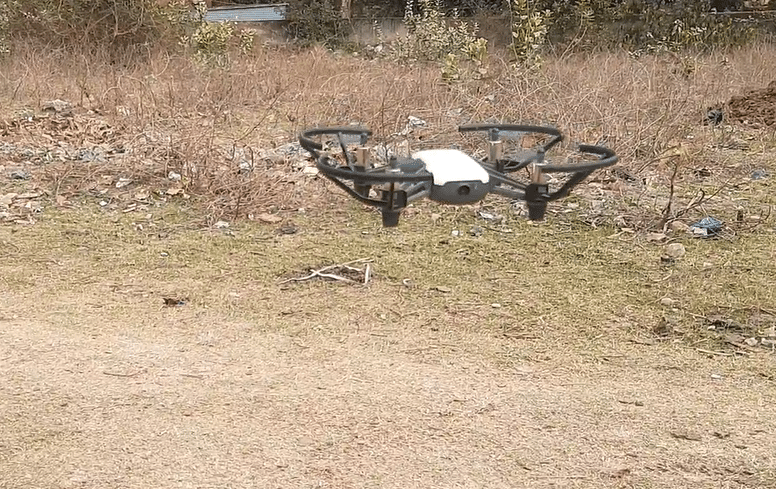
The Face Tracking and Movement Following Drone project bridges computer vision and aerial robotics by using a host computer running Python to process a live video stream from a DJI Tello drone. The system leverages the OpenCV library alongside the face_recognition module and NumPy to detect and analyze facial features in real time. When the Python script runs on a Linux PC or Windows environment via VirtualBox, it establishes a wireless connection to the drone. As the camera captures frames, the algorithm identifies a target face and calculates its spatial coordinates relative to the center of the video frame. Based on these calculated offsets, the software computes directional commands. It utilizes the Tello Python library to transmit movement commands—such as yaw adjustments, altitude changes, and forward or backward translation—via UDP network packets. This creates a closed-loop feedback system where the drone continuously adjusts its flight path to keep the recognized face centered in its field of view, effectively tracking the subject autonomously.
Why Build This
Explore advanced computer vision pipelines by integrating real-time facial recognition algorithms with physical flight dynamics.
Implement closed-loop control systems where software sensor inputs directly dictate hardware actuation in a wireless network.
Develop practical competencies in edge machine learning applications suited for autonomous aerial robotics and surveillance.
Real-World Application
Automated subject tracking for aerial photography, security surveillance, and hands-free drone navigation.
Skills You'll Learn
Computer vision processing
Facial recognition implementation
UDP network communication
Closed-loop control systems
Python asynchronous programming
Safety Precautions
Exercise caution when operating drones indoors; ensure adequate space and keep a manual override ready to land safely using the 'Q' key.
Technology Tags
PYTHON
OPENCV
DLIB
NUMPY
FACE RECOGNITION
DRONES
TELLO SDK
Frequently Asked Questions
A standard PC or laptop running Linux (or Windows via VirtualBox) with Python 3 is sufficient to process the video stream and run the OpenCV and face_recognition libraries.
The computer communicates with the drone wirelessly via Wi-Fi, sending control commands using the Tello Python library over UDP network sockets.
The behavior depends on how the Python script is written, but generally, the drone will hover in place until a face is re-identified or until you trigger a manual landing using the 'Q' key.
This page is part of Kitkraft's Project Hub — a curated collection of electronics & robotics projects gathered from the maker community to help students and hobbyists discover and learn to build. Kitkraft does not claim authorship of the original project, and makes no representation as to the accuracy, completeness or safety of third-party source material. The summary and "How It Works" explanation above are AI-generated, rewritten with reference to the original tutorial — not a reproduction of it. Full credit and a direct link to the original source are provided above. If you're the original creator and have a concern about how your work is represented here, please contact us and we'll address it promptly.