Frequency-Dependent Switch Model For AC Power Signals With Pspice
Project Hub
/Audio Displays & Interactive Media/LED Matrix & Cube Displays/Frequency-Dependent Switch Model For AC Power Signals With Pspice
Advanced
PIC
< ₹500
3 – 6 Hours
Frequency-Dependent Switch Model For AC Power Signals With Pspice
A frequency-dependent switch model designed for PSpice simulation allows experts to route AC signals and address challenges in advanced electronic systems.
We stock the boards, sensors and modules this project needs. A full parts list is coming soon — for now, browse our DIY Kits & components or search for PIC parts.
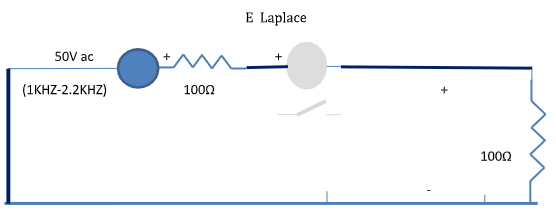
This project implements a frequency-dependent switch model specifically designed for AC power signals using PSpice simulation software. In advanced electronic systems, routing signals dynamically based on their frequency components is a crucial challenge. By leveraging a computer equipped with PSpice Lite, undergraduate engineering students can model, simulate, and analyze how specialized switching behaviors respond to varying AC signal characteristics without needing physical hardware prototyping. The simulation framework allows users to observe how the switch selectively alters its state or routing path as a function of the input frequency. This functionality is essential for managing complex signal paths, isolating specific frequency bands, or bypassing distinct circuit elements entirely within a virtual environment. Through PSpice, learners can adjust simulation parameters, run transient or AC sweep analyses, and evaluate the performance of the switch model under different operational conditions. The system bridges theoretical circuit analysis with practical simulation tools, offering deep insight into frequency-domain behavior and advanced circuit control strategies.
Why Build This
Simulate advanced AC signal routing and frequency-selective behavior for complex engineering systems.
Gain hands-on proficiency with PSpice Lite modeling techniques relevant to undergraduate coursework.
Evaluate circuit performance for high-frequency or automated test applications entirely within a virtual environment.
Real-World Application
Used in UHF or higher radio bands, automatic test equipment (ATE) systems, and routing signals through multiple paths or bypassing circuit elements.
Skills You'll Learn
PSpice circuit simulation
AC signal analysis
frequency-dependent modeling
virtual prototyping
circuit control strategies
Safety Precautions
No specific precautions noted for this build — always follow general electronics safety practices.
Technology Tags
PSPICE
SIMULATION
ANALOGUE BEHAVIOURAL MODELLING
CIRCUIT SIMULATION
FREQUENCY ANALYSIS
Frequently Asked Questions
You need a computer with PSpice Lite installed, which is available for simulation purposes.
No physical hardware is required; this is entirely a simulation-based project using PSpice.
The model is specifically designed to handle AC power signals and route them based on their frequency.
Gallery
This page is part of Kitkraft's Project Hub — a curated collection of electronics & robotics projects gathered from the maker community to help students and hobbyists discover and learn to build. Kitkraft does not claim authorship of the original project, and makes no representation as to the accuracy, completeness or safety of third-party source material. The summary and "How It Works" explanation above are AI-generated, rewritten with reference to the original tutorial — not a reproduction of it. Full credit and a direct link to the original source are provided above. If you're the original creator and have a concern about how your work is represented here, please contact us and we'll address it promptly.
Kitkraft Project Hub — curated from the maker community, credited at the source.