This project is sourced from another site, not written by us — this list is our best match of their components against what we stock, not a verified bill of materials. Always check the original blog (linked above) for the actual parts list before buying.
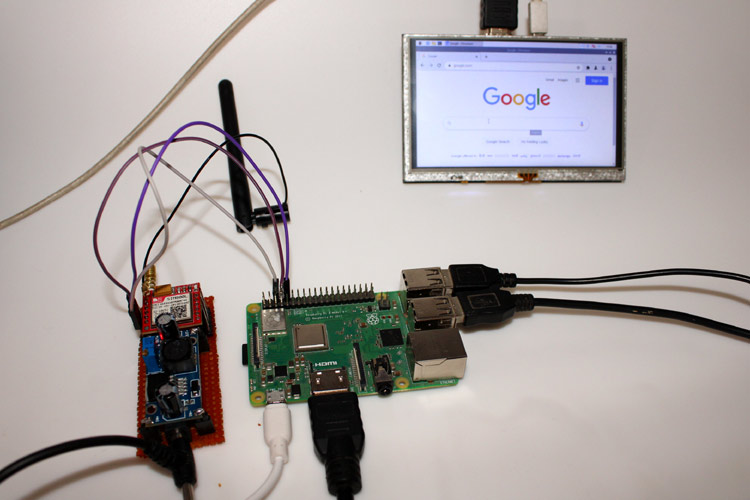
This project establishes a cellular data connection for a Raspberry Pi 5 by interfacing it with a GSM SIM800L module using a Point-to-Point Protocol (PPP) stack. Because cellular communication modules require a dedicated power source capable of handling sudden current spikes during GPRS data transmission, the system uses an LM2596 buck converter to step down and stabilize the supply voltage from an external source to the module, preventing voltage sags that could reset the modem. A working networked SIM card is inserted into the SIM800L, allowing it to register with a cellular tower. The Raspberry Pi communicates with the SIM800L module via serial communication (UART) using jumper wires for signal transmission. Once the hardware layer is powered and connected, software tools including Python 3, screen, and chat scripts are used to configure the AT command interface, initialize the modem, and dial the network provider. The ppp daemon then establishes a network interface over the serial link, wrapping cellular data packets into standard internet protocol packets so the Raspberry Pi can route traffic over the cellular network just as it would over Ethernet or Wi-Fi. Finally, text-based browsers like elinks can be utilized to verify active web connectivity directly from the command line.
Why Build This
Deploy standalone remote Internet of Things (IoT) nodes in field environments where traditional Wi-Fi and wired Ethernet infrastructures are completely absent.
Gain hands-on undergraduate-level experience implementing the Point-to-Point Protocol (PPP) to bridge serial communication interfaces with modern IP networking stacks.
Learn to manage power delivery challenges in embedded electronics by utilizing buck converters to handle high-current transient loads without destabilizing the host microcontroller or single-board computer.
Real-World Application
Providing remote internet connectivity for standalone IoT deployments where Wi-Fi or ethernet is unavailable.
Skills You'll Learn
Cellular network provisioning
Point-to-Point Protocol (PPP) configuration
serial UART communication
AT command modem control
DC-DC buck converter integration
power management for high-transient loads
Linux network interface configuration
Safety Precautions
Ensure a stable and adequate power supply (using a buck converter) for the SIM800L module, as it draws high current peaks during GPRS transmission.
Technology Tags
RASPBERRY PI
GSM
SIM800L
GPRS
PPP
PYTHON
SERIAL COMMUNICATION
IOT
NETWORKING
Frequently Asked Questions
The SIM800L module draws brief, high-current peaks (up to 2A) during GPRS transmission. The Raspberry Pi's on-board regulators cannot supply these sudden surges reliably, which can cause the module to brownout, drop network registration, or crash the Pi.
PPP provides a standard method for transporting multi-protocol datagrams over a point-to-point serial link, effectively allowing the Raspberry Pi to treat the serial connection to the cellular modem as a standard network interface.
You need a working, activated SIM card that supports 2G GSM networks (or compatible fallback bands in your region) with an active cellular data plan, as modern 4G/5G-only SIM cards may not register with the module's 2G modem.
Gallery
This page is part of Kitkraft's Project Hub — a curated collection of electronics & robotics projects gathered from the maker community to help students and hobbyists discover and learn to build. Kitkraft does not claim authorship of the original project, and makes no representation as to the accuracy, completeness or safety of third-party source material. The summary and "How It Works" explanation above are AI-generated, rewritten with reference to the original tutorial — not a reproduction of it. Full credit and a direct link to the original source are provided above. If you're the original creator and have a concern about how your work is represented here, please contact us and we'll address it promptly.
 Raspberry Pi 3 - Model B+ 1.4Ghz 64-bit quad-core Processor with 1 GB Ram (Original)
Rs. 5,400.00
 Jumper Wire 10 Pin Male To Male 20cm
Rs. 45.00
 MB102 Adjustable Breadboard Power Supply Module (3.3V & 5V) for Arduino & Raspberry Pi
Rs. 139.00
 400 Points Mini Solderless Prototype PCB Breadboard High Quality
Rs. 89.00
 Jumper Wire 10 Pin Male To Female 20cm
Rs. 45.00


