Implementing Position Hold using Optical flow sensor and ToF on Litewing ESP32 Drone
Project Hub
/Basic Analog & Power Electronics/Sequential, Timing & Pulse Circuits/Implementing Position Hold using Optical flow sensor and ToF on Litewing ESP32 Drone
Intermediate
ESP32
Project Specific
3 – 6 Hours
Partial Kit
Implementing Position Hold using Optical flow sensor and ToF on Litewing ESP32 Drone
Learn how to implement an autonomous position hold system on the Litewing ESP32 drone using an optical flow sensor, Time-of-Flight sensor, and dead reckoning algorithms.
This project is sourced from another site, not written by us — this list is our best match of their components against what we stock, not a verified bill of materials. Always check the original blog (linked above) for the actual parts list before buying.
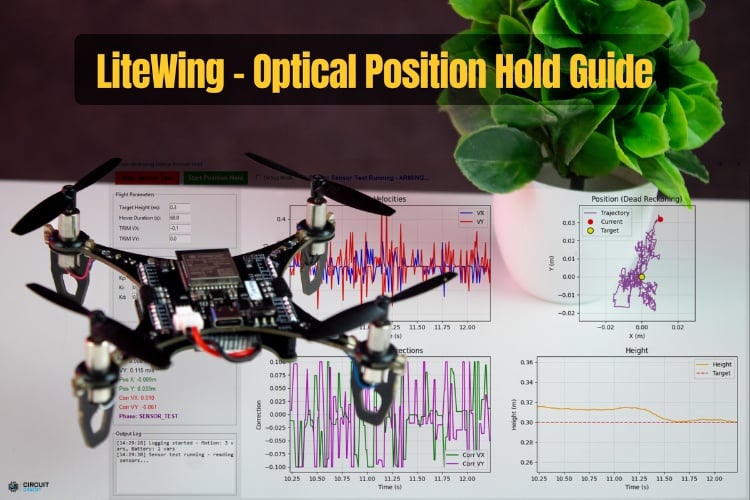
Implementing autonomous position hold on the Litewing ESP32 Drone relies on a combination of visual surface tracking and precise distance measurement to maintain a stable hover without relying on external GPS signals. At the heart of this system is the Litewing Flight Positioning Module, which houses a PMW3901MB optical flow sensor and a VL53L1X Time-of-Flight (ToF) sensor. The optical flow sensor acts essentially like an inverted computer mouse, taking high-speed sequential images of the ground beneath the drone to detect relative surface movement in the X and Y axes using dead reckoning algorithms. Simultaneously, the VL53L1X ToF sensor emits infrared laser light and measures the time it takes for the photons to bounce back from the ground, providing accurate, real-time altitude (Z-axis) data. The ESP32 DevKit v1 microcontroller reads data from both sensors via communication buses, processing the optical shifts and height measurements to calculate how much the drone is drifting. By running Python scripts utilizing the cflib library and CRTP communication over UDP, the ESP32 dynamically adjusts the motor outputs of the Litewing ESP32 Drone to counteract drift, locking the aircraft into a steady, stationary position in mid-air.
Why Build This
Learn how drones achieve stable autonomous indoor navigation and hovering without relying on GPS satellites.
Gain hands-on experience integrating optical flow and Time-of-Flight sensors with a microcontroller.
Understand the principles of dead reckoning and sensor fusion for real-time flight control.
Real-World Application
Autonomous drone navigation, indoor aerial photography, and stable hover systems without GPS dependency.
Skills You'll Learn
Optical flow tracking
Time-of-Flight distance measurement
sensor fusion
dead reckoning algorithms
UDP communication
Python drone programming
ESP32 microcontroller interfacing
Safety Precautions
Ensure proper calibration, clear surroundings during flight tests, and respect safety limits on control corrections to prevent sudden destabilization.
Frequently Asked Questions
Optical flow sensors and ToF sensors can sometimes be affected by extremely bright ambient light or reflective outdoor surfaces, so this project is primarily designed and optimized for indoor environments.
Some familiarity with Python programming and microcontroller basics is recommended, as you will be working with the LiteWing Python SDK, GitHub repositories, and network communication libraries.
GPS signals are typically unavailable or inaccurate indoors; instead, this project uses an optical flow sensor to track ground textures and a ToF sensor to measure height, achieving precise relative positioning locally.
Gallery
This page is part of Kitkraft's Project Hub — a curated collection of electronics & robotics projects gathered from the maker community to help students and hobbyists discover and learn to build. Kitkraft does not claim authorship of the original project, and makes no representation as to the accuracy, completeness or safety of third-party source material. The summary and "How It Works" explanation above are AI-generated, rewritten with reference to the original tutorial — not a reproduction of it. Full credit and a direct link to the original source are provided above. If you're the original creator and have a concern about how your work is represented here, please contact us and we'll address it promptly.
Kitkraft Project Hub — curated from the maker community, credited at the source.
 ESP32 WiFi+Bluetooth CP2102 Development Board
Rs. 520.00
 400 Points Mini Solderless Prototype PCB Breadboard High Quality
Rs. 89.00
 MB102 Adjustable Breadboard Power Supply Module (3.3V & 5V) for Arduino & Raspberry Pi
Rs. 139.00
 Jumper Wire 10 Pin Male To Male 20cm
Rs. 45.00
 Jumper Wire 10 Pin Male To Female 20cm
Rs. 45.00


