This project is sourced from another site, not written by us — this list is our best match of their components against what we stock, not a verified bill of materials. Always check the original blog (linked above) for the actual parts list before buying.
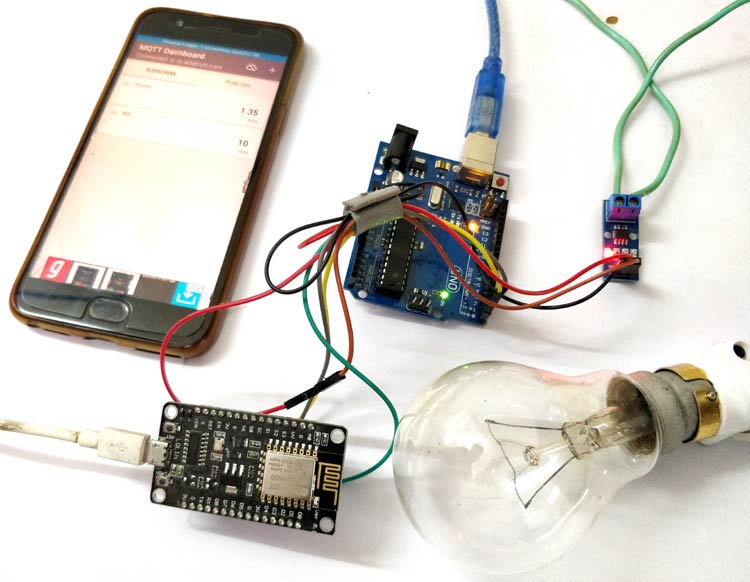
The IoT-Based Electricity Energy Meter system centers around monitoring electrical current and transmitting that data to the cloud for remote visualization. At the heart of the sensing setup is the ACS712 Current Sensor Module, which measures the electrical current flowing through a connected circuit and outputs a proportional analog voltage signal. This analog voltage is read by the Arduino board, which processes the raw data to calculate the current and power usage values. Because the Arduino Uno lacks native wireless capabilities, it interfaces with an ESP12/ESP8266 Wi-Fi module. This ESP module acts as the gateway to the internet, taking the processed metrics from the microcontroller and transmitting them securely over a Wi-Fi network. The data is sent directly to Adafruit IO, an online IoT platform, where users can view real-time graphs and logs of their power consumption from anywhere with an internet connection. The entire circuit is prototyped on a breadboard using connecting wires, and a stable power supply delivers the necessary operating voltages to the Arduino, sensors, and Wi-Fi modules.
Why Build This
Design and implement practical smart home energy monitoring systems for real-world electrical auditing.
Gain hands-on experience bridging local microcontroller data acquisition with cloud-based IoT dashboards like Adafruit IO.
Develop undergraduate-level competencies in interfacing analog current sensors with digital microcontrollers and Wi-Fi modules.
Real-World Application
Smart home energy monitoring, remote power consumption tracking, and IoT-based electrical auditing.
Skills You'll Learn
Analog sensor interfacing
Microcontroller serial communication
Wi-Fi module configuration
Cloud IoT dashboard integration
Power and current calculation
Safety Precautions
Working with mains electricity or high-current circuits poses a risk of electric shock. Exercise caution and ensure proper insulation and wiring practices.
Technology Tags
IOT
WI-FI
ACS712
CURRENT SENSOR
ADAFRUIT IO
ENERGY METER
ESP8266
Frequently Asked Questions
The Arduino Uno handles the local task of reading the analog values from the ACS712 sensor, but it does not have built-in Wi-Fi. The ESP12 module provides the necessary wireless connectivity to transmit that processed data to the cloud.
Yes, you will need the Arduino IDE to program the hardware and an account on Adafruit IO to create the dashboard and visualize your remote power consumption metrics.
Yes, but you must ensure your power supply can provide sufficient current for both devices, particularly when the ESP12 is actively transmitting data over Wi-Fi, as power spikes can cause instability if the supply is inadequate.
Gallery
This page is part of Kitkraft's Project Hub — a curated collection of electronics & robotics projects gathered from the maker community to help students and hobbyists discover and learn to build. Kitkraft does not claim authorship of the original project, and makes no representation as to the accuracy, completeness or safety of third-party source material. The summary and "How It Works" explanation above are AI-generated, rewritten with reference to the original tutorial — not a reproduction of it. Full credit and a direct link to the original source are provided above. If you're the original creator and have a concern about how your work is represented here, please contact us and we'll address it promptly.
Kitkraft Project Hub — curated from the maker community, credited at the source.
 NodeMCU ESP8266 WIFI development board based on CP2102
Rs. 660.00
 Jumper Wire 10 Pin Male To Male 20cm
Rs. 45.00
 MB102 Adjustable Breadboard Power Supply Module (3.3V & 5V) for Arduino & Raspberry Pi
Rs. 139.00
 400 Points Mini Solderless Prototype PCB Breadboard High Quality
Rs. 89.00
 Jumper Wire 10 Pin Male To Female 20cm
Rs. 45.00


