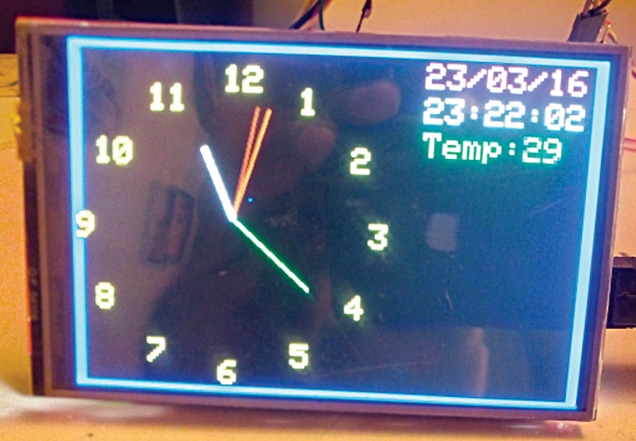
This DIY project displays an analogue clock, digital date, and room temperature on a 3.5-inch TFT display using an Arduino Uno and a GPS receiver module.
This project is sourced from another site, not written by us — this list is our best match of their components against what we stock, not a verified bill of materials. Always check the original blog (linked above) for the actual parts list before buying.
The Make your own GPS Analogue Clock project combines precise satellite timing with local environmental sensing to create a functional desktop display. At the heart of the system is an Arduino Uno, which coordinates data collection and visual output. The U-Blox NEO-6M GPS receiver continuously communicates with global navigation satellites to acquire Coordinated Universal Time (UTC) and positional data. The Arduino parses this incoming serial data to extract the exact time, which is then translated into mathematical coordinates for the hour, minute, and second hands of an analogue clock face. Simultaneously, an LM35 or TMP36 temperature sensor measures the ambient room temperature by outputting a proportional analog voltage that the Arduino reads through its analog-to-digital converter. To ensure reliable power distribution, especially given that the 3.5-inch TFT shield operates primarily on 3.3V, an LD1117V33 voltage regulator steps down the supply voltage to prevent overheating. The compiled graphical interface—featuring the analogue clock, digital date, and temperature reading—is rendered onto the 3.5-inch TFT screen using the Adafruit_GFX graphics library and the mcufriend_kbd.h header file, completing a self-contained timing and monitoring station.
Why Build This
Create a reliable, self-setting wall clock that never needs manual adjustment thanks to satellite GPS synchronization.
Learn how to integrate analog environmental sensors with digital microcontrollers to display real-time sensor data.
Build practical competence in handling specialized display shields and managing multi-voltage requirements in hardware projects.
Real-World Application
Accurate timekeeping devices, weather monitoring, automated display systems, and synchronized clocks for public or industrial areas.
Skills You'll Learn
Serial communication parsing
analog-to-digital conversion
TFT display graphics rendering
sensor signal conditioning
power supply voltage regulation
Safety Precautions
The TFT shield is primarily rated for 3.3V operation; prolonged operation on 5V without a proper regulator can cause overheating and potential damage.
Technology Tags
GPS
TFT DISPLAY
ARDUINO
TEMPERATURE SENSOR
LM35
TMP36
U-BLOX NEO-6M
C++
SPI
Frequently Asked Questions
The Arduino Uno's internal clock can drift over time. A GPS receiver locks onto atomic clocks on satellites, providing highly accurate, automatically synchronized time without manual calibration.
The TFT shield is primarily rated for 3.3V operation. Prolonged operation on 5V without a proper regulator like the LD1117V33 can cause overheating and potential component damage.
The U-Blox NEO-6M module typically requires a clear view of the sky or placement near a window to lock onto satellite signals indoors, though initial testing can sometimes be done near glass.
Gallery
This page is part of Kitkraft's Project Hub — a curated collection of electronics & robotics projects gathered from the maker community to help students and hobbyists discover and learn to build. Kitkraft does not claim authorship of the original project, and makes no representation as to the accuracy, completeness or safety of third-party source material. The summary and "How It Works" explanation above are AI-generated, rewritten with reference to the original tutorial — not a reproduction of it. Full credit and a direct link to the original source are provided above. If you're the original creator and have a concern about how your work is represented here, please contact us and we'll address it promptly.
 Arduino UNO R3 Board (Compatible) – ATmega328P Microcontroller with USB Cable
Rs. 999.00
 MB102 Adjustable Breadboard Power Supply Module (3.3V & 5V) for Arduino & Raspberry Pi
Rs. 139.00
 400 Points Mini Solderless Prototype PCB Breadboard High Quality
Rs. 89.00
 Jumper Wire 10 Pin Male To Male 20cm
Rs. 45.00
 Jumper Wire 10 Pin Male To Female 20cm
Rs. 45.00


