This project is sourced from another site, not written by us — this list is our best match of their components against what we stock, not a verified bill of materials. Always check the original blog (linked above) for the actual parts list before buying.
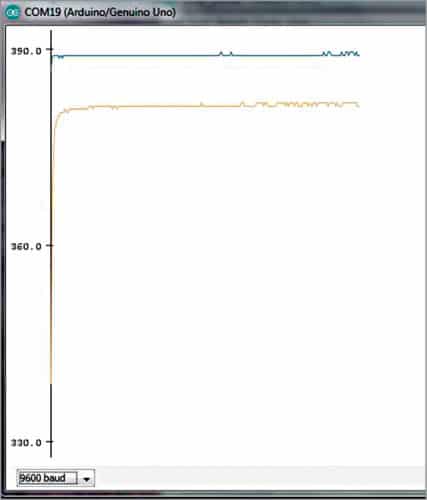
This project implements a multi-point thermal monitoring system using an Arduino Uno board, a breadboard, connecting wires, and two LM35 temperature sensors. The LM35 is an integrated circuit sensor that outputs an analog voltage directly proportional to the Celsius temperature, eliminating the need for complex external scaling circuitry. Each LM35 requires a power supply, ground connection, and an output pin connected to one of the Arduino Uno's analog-to-digital converter (ADC) pins. As ambient or operational temperatures fluctuate, the analog voltage output from each sensor changes dynamically. The Arduino Uno continuously samples these analog voltage levels through its ADC channels. Inside the microcontroller, the raw integer values from the ADC are mathematically converted into readable temperature values. To visualize the data in real-time, the Arduino transmits these calculated temperatures over the USB serial communication interface to a host computer running the Arduino IDE. By formatting the data streams separated by commas or spaces, the Arduino IDE's built-in Serial Plotter interprets the input as multiple independent data series. This generates real-time, multi-colored graphical waveforms on the screen, allowing an operator to visually track, compare, and analyze thermal fluctuations from both sensor locations simultaneously without needing external display hardware.
Why Build This
Gain practical experience designing multi-sensor data acquisition systems suitable for undergraduate engineering applications.
Implement real-time data visualization techniques using the Arduino Serial Plotter for thermal analysis.
Understand the principles of analog signal conditioning and analog-to-digital conversion using microcontroller ADC channels.
Real-World Application
Industrial process monitoring in steel plants, petrochemical facilities, and manufacturing plants where continuous real-time tracking of process variables like temperature is essential.
Skills You'll Learn
Analog sensor interfacing
multi-channel analog-to-digital conversion
serial data formatting
real-time graphical data visualization
basic circuit prototyping on breadboards
Safety Precautions
No specific precautions noted for this build — always follow general electronics safety practices.
Technology Tags
ARDUINO
LM35
TEMPERATURE SENSOR
SERIAL PLOTTER
EMBEDDED SYSTEMS
DATA ACQUISITION
HMI
SENSORS
Frequently Asked Questions
Yes, you can add more sensors as long as your Arduino board has available analog input pins and you format the serial output string to include the additional data streams.
This is usually caused by electrical noise picked up by long connecting wires. Ensure your ground connections are solid and consider adding small filtering capacitors if necessary.
No external libraries are required. The standard Arduino Serial.print() and Serial.println() functions are sufficient to send formatted data to the built-in Arduino IDE Serial Plotter.
Gallery
This page is part of Kitkraft's Project Hub — a curated collection of electronics & robotics projects gathered from the maker community to help students and hobbyists discover and learn to build. Kitkraft does not claim authorship of the original project, and makes no representation as to the accuracy, completeness or safety of third-party source material. The summary and "How It Works" explanation above are AI-generated, rewritten with reference to the original tutorial — not a reproduction of it. Full credit and a direct link to the original source are provided above. If you're the original creator and have a concern about how your work is represented here, please contact us and we'll address it promptly.
 Arduino UNO R3 Board (Compatible) – ATmega328P Microcontroller with USB Cable
Rs. 999.00
 Jumper Wire 10 Pin Male To Male 20cm
Rs. 45.00
 MB102 Adjustable Breadboard Power Supply Module (3.3V & 5V) for Arduino & Raspberry Pi
Rs. 139.00
 400 Points Mini Solderless Prototype PCB Breadboard High Quality
Rs. 89.00
 Jumper Wire 10 Pin Male To Female 20cm
Rs. 45.00


