This project is sourced from another site, not written by us — this list is our best match of their components against what we stock, not a verified bill of materials. Always check the original blog (linked above) for the actual parts list before buying.
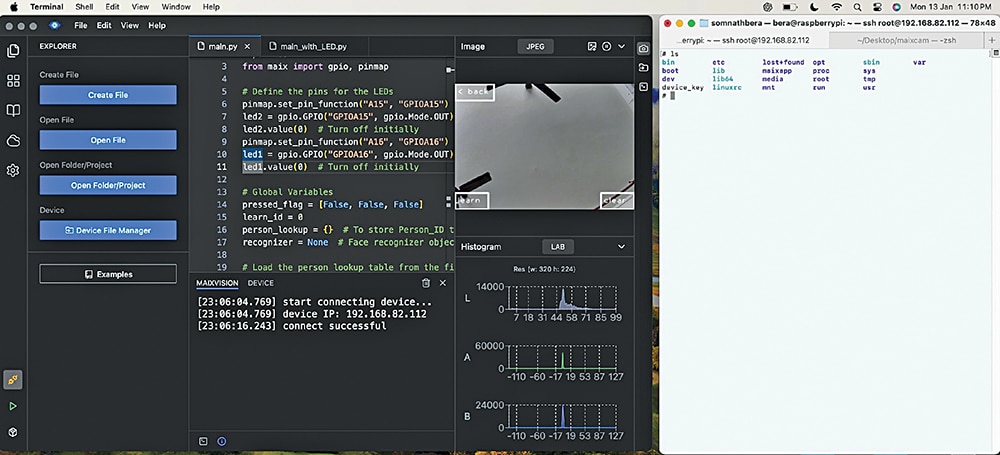
The Real-time Face Recognition with YOLO system operates as an edge artificial intelligence device centered around the MaixCam development board. The workflow begins when the integrated camera module captures live visual data from the environment. This video feed is processed locally on the board using a lightweight YOLOv8 model deployed via Python 3.11 and the MaixPy environment, which has been programmed using the MaixVision IDE. As the neural network analyzes the incoming frames, it performs object detection to locate human faces and applies a 5-point facial landmarking system to map key facial features such as the eyes, nose, and mouth corners. This local inference allows the system to distinguish between known and unknown individuals in real time without needing to offload computations to a cloud server. Based on the classification and recognition results, the MaixCam can output control signals to peripheral hardware. For instance, it can toggle the red and green LEDs to visually indicate status, such as granting access for a recognized face or denying access for an unknown face. The entire setup is continuously powered by a dedicated 5V 2A adaptor, ensuring stable voltage and current delivery to both the development board and its connected indicators during high-load machine learning operations.
Why Build This
Design and deploy an edge AI access control system capable of running computer vision models locally on a microcontroller-class development board.
Implement real-time object detection and facial landmarking pipelines suitable for commercial MSME applications like automated attendance tracking.
Bridge high-level Python software development using YOLOv8 with physical hardware actuation via status LEDs.
Real-World Application
Face recognition-based doorbell, attendance and time management system for small and medium enterprises (MSMEs), and automated access control.
Skills You'll Learn
Edge AI model deployment
Neural network inference optimization
Computer vision pipeline development
Object detection and landmarking
Python-based hardware control
Safety Precautions
No specific precautions noted for this build — always follow general electronics safety practices.
Technology Tags
YOLO
YOLOV8
FACE RECOGNITION
EDGE AI
PYTHON
MAIXPY
COMPUTER VISION
LANDMARK DETECTION
SIPEED
EMBEDDED SYSTEMS
Frequently Asked Questions
Running real-time neural network inference like YOLOv8 on an edge vision board demands significant processing power, which draws more current than a standard computer USB port can reliably supply, making a dedicated 5V 2A adaptor necessary to prevent unexpected reboots.
No, model training typically requires high-performance GPUs and is done offline in Python. You then convert and deploy the pre-trained weights to the MaixCam board for inference using the MaixVision IDE.
The 5-point landmarking system pinpoints specific facial features like eyes and the nose to align and normalize the face image before recognition, improving the accuracy of identifying known versus unknown individuals.
Gallery
This page is part of Kitkraft's Project Hub — a curated collection of electronics & robotics projects gathered from the maker community to help students and hobbyists discover and learn to build. Kitkraft does not claim authorship of the original project, and makes no representation as to the accuracy, completeness or safety of third-party source material. The summary and "How It Works" explanation above are AI-generated, rewritten with reference to the original tutorial — not a reproduction of it. Full credit and a direct link to the original source are provided above. If you're the original creator and have a concern about how your work is represented here, please contact us and we'll address it promptly.
Kitkraft Project Hub — curated from the maker community, credited at the source.
 10pcs 5mm RED Diffused Light Emitting Diodes - LEDs Set
Rs. 39.00
 MB102 Adjustable Breadboard Power Supply Module (3.3V & 5V) for Arduino & Raspberry Pi
Rs. 139.00
 400 Points Mini Solderless Prototype PCB Breadboard High Quality
Rs. 89.00
 Jumper Wire 10 Pin Male To Male 20cm
Rs. 45.00
 Jumper Wire 10 Pin Male To Female 20cm
Rs. 45.00


