Project Hub
/IoT & Connected Devices/Asset Tracking & GPS/Real Time Logistics Tracking with Google Sheets
Advanced
ESP8266
₹1,500 – ₹5,000
3 – 6 Hours
Partial Kit
Real Time Logistics Tracking with Google Sheets
Build a real-time logistics tracking system using an ESP microcontroller, GPS module, and Google Sheets for live location updates and route visualization.
We stock the boards, sensors and modules this project needs. A full parts list is coming soon — for now, browse our DIY Kits & components or search for ESP8266 parts.
This project is sourced from another site, not written by us — this list is our best match of their components against what we stock, not a verified bill of materials. Always check the original blog (linked above) for the actual parts list before buying.
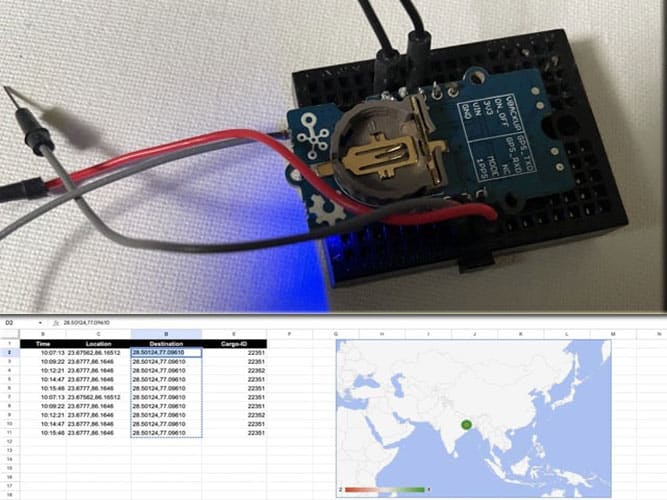
The Real Time Logistics Tracking system operates by integrating satellite positioning technology with cloud-based data storage using an ESP8266 NodeMCU microcontroller. At the heart of the hardware setup is the AIR 530 GPS module, which communicates with the ESP microcontroller via serial communication handled by the SoftwareSerial library. The GPS module continuously receives signals from navigation satellites to calculate precise geographical coordinates, including latitude and longitude. The TinyGPS++ library parses these incoming raw NMEA sentences into readable numerical variables within the Arduino IDE environment. Once the microcontroller acquires a valid position fix, it utilizes its onboard Wi-Fi capabilities to connect to a local wireless network. It then sends an HTTP request containing the current location data directly to the cloud through the Google Sheets API. Each data packet is appended as a new row in a cloud spreadsheet, allowing users to monitor live location updates and perform route visualization remotely without needing dedicated server infrastructure. A 3.3V micro battery provides the necessary power to sustain the system during mobile deployment.
Why Build This
Design and deploy an end-to-end IoT pipeline that bridges physical microcontroller hardware with cloud-based spreadsheet analytics.
Implement GNSS data parsing techniques using dedicated software libraries to extract actionable geographic coordinates.
Gain practical experience in modern supply chain telemetry and automated remote asset monitoring for undergraduate engineering applications.
Real-World Application
Real-time tracking of land-based logistics, cargo monitoring, and supply chain management.
Skills You'll Learn
GPS data parsing
UART and SoftwareSerial communication
Wi-Fi microcontroller networking
HTTP API integration
cloud data logging
Safety Precautions
No specific precautions noted for this build — always follow general electronics safety practices.
Technology Tags
GPS
GOOGLE SHEETS
IOT
WI-FI
TINYGPS++
SOFTWARESERIAL
CLOUD INTEGRATION
Frequently Asked Questions
The ESP8266 connects to your local Wi-Fi network and uses the Google Sheets API via HTTPS requests to securely post location coordinates directly into your cloud spreadsheet.
The SoftwareSerial library allows you to create an additional software-based serial port on the ESP microcontroller to communicate with the AIR 530 GPS module while leaving the hardware serial port free for debugging through the Arduino IDE.
While the GPS module will still calculate coordinates offline, the system requires an active Wi-Fi internet connection to transmit those updates to Google Sheets in real time.
Gallery
This page is part of Kitkraft's Project Hub — a curated collection of electronics & robotics projects gathered from the maker community to help students and hobbyists discover and learn to build. Kitkraft does not claim authorship of the original project, and makes no representation as to the accuracy, completeness or safety of third-party source material. The summary and "How It Works" explanation above are AI-generated, rewritten with reference to the original tutorial — not a reproduction of it. Full credit and a direct link to the original source are provided above. If you're the original creator and have a concern about how your work is represented here, please contact us and we'll address it promptly.
Kitkraft Project Hub — curated from the maker community, credited at the source.