S3 Private AI Station: The 100% Private Desktop Assistant
Project Hub
/Artificial Intelligence & Edge ML/NLP / LLM Hardware Interface/S3 Private AI Station: The 100% Private Desktop Assistant
Intermediate
ESP32
₹5,000 – ₹15,000
3 – 6 Hours
Partial Kit
S3 Private AI Station: The 100% Private Desktop Assistant
Build a 100% private desktop AI assistant using an ESP32-S3-BOX-3 combined with a local Python bridge and Ollama for edge-based natural language processing.
This project is sourced from another site, not written by us — this list is our best match of their components against what we stock, not a verified bill of materials. Always check the original blog (linked above) for the actual parts list before buying.
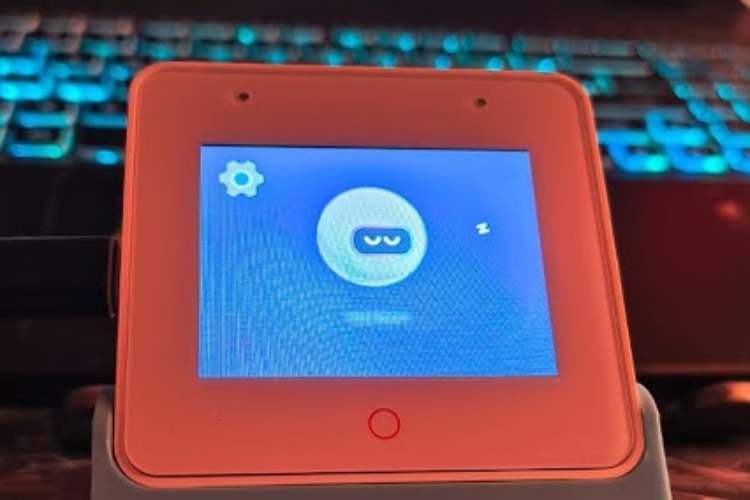
The S3 Private AI Station operates as an offline, hardware-accelerated desktop assistant by bridging a microcontroller interface with a local host computer running large language models. At the core of the system is the ESP32-S3-BOX-3 development kit, which captures user interactions and interfaces with peripheral hardware, including a 4-wire analog RGB LED strip connected to its expansion headers for visual status feedback. Powered and connected via a USB-C cable to a PC, the ESP32-S3 communicates with a local Python script running a Flask server. When a voice or text command is initiated, the Flask application processes the input using libraries like speech_recognition and edge_tts for text-to-speech conversion. The system then routes the natural language prompt entirely offline to Ollama—running a model such as qwen2.5:7b—ensuring all data processing remains on the local machine without routing through third-party cloud servers. Once Ollama generates a response, the Python backend can optionally execute desktop automation tasks via pyautogui or update the ESP32-S3-driven RGB LED strip to reflect the current state of the AI assistant. ESP-IDF provides the underlying firmware framework running on the microcontroller to handle low-level input-output operations and communication protocols over the USB-C interface.
Why Build This
Design secure, offline smart home or industrial automation interfaces that completely eliminate dependence on third-party cloud APIs and data harvesting.
Gain hands-on engineering experience integrating edge microcontroller hardware with local large language model (LLM) backends using Python and Flask.
Implement localized desktop automation and voice control systems suitable for high-privacy environments where data sovereignty is strictly required.
Real-World Application
Privacy-focused smart home automation, offline voice assistants, secure local voice control for industrial or home environments without relying on third-party cloud servers.
Skills You'll Learn
Microcontroller firmware development
Python Flask server implementation
local LLM integration
edge-based speech recognition and synthesis
desktop GUI automation
analog RGB LED control
serial communication over USB-C
Safety Precautions
Ensure correct wiring polarity when connecting the external RGB LED strip to avoid short circuits or damaging the ESP32-S3 expansion header pins.
Technology Tags
ESP32
ESP-IDF
EDGE AI
ARTIFICIAL INTELLIGENCE
OLLAMA
PYTHON
SPEECH RECOGNITION
TEXT TO SPEECH
INTERNET OF THINGS
IOT
FLASK
PYAUTOGUI
Frequently Asked Questions
No. Once Ollama, the Python dependencies, and the required LLM are downloaded and installed on your host PC, the entire pipeline operates locally and offline.
The 4-wire analog RGB LED strip connects to the ESP32-S3 expansion headers to provide visual feedback, indicating the operational state or responsiveness of the private AI station.
Running local models like qwen2.5:7b via Ollama efficiently typically requires a dedicated CPU, sufficient RAM, and ideally a compatible GPU to maintain acceptable processing speeds for natural language generation.
Gallery
This page is part of Kitkraft's Project Hub — a curated collection of electronics & robotics projects gathered from the maker community to help students and hobbyists discover and learn to build. Kitkraft does not claim authorship of the original project, and makes no representation as to the accuracy, completeness or safety of third-party source material. The summary and "How It Works" explanation above are AI-generated, rewritten with reference to the original tutorial — not a reproduction of it. Full credit and a direct link to the original source are provided above. If you're the original creator and have a concern about how your work is represented here, please contact us and we'll address it promptly.
Kitkraft Project Hub — curated from the maker community, credited at the source.
 ESP32-C3 Development Board with Berg Pins - Unsoldered
Rs. 390.00
 Cable for Arduino Nano (USB 2.0 A to USB 2.0 Mini B) 30cm
Rs. 69.00
 400 Points Mini Solderless Prototype PCB Breadboard High Quality
Rs. 89.00
 MB102 Adjustable Breadboard Power Supply Module (3.3V & 5V) for Arduino & Raspberry Pi
Rs. 139.00
 Jumper Wire 10 Pin Male To Male 20cm
Rs. 45.00
 Jumper Wire 10 Pin Male To Female 20cm
Rs. 45.00


