SensWear: An Open Source Modular Wearable Platform
Project Hub
/Artificial Intelligence & Edge ML/Gesture Recognition/SensWear: An Open Source Modular Wearable Platform
Advanced
AI / ML
₹5,000 – ₹15,000
6 – 12 Hours
Partial Kit
SensWear: An Open Source Modular Wearable Platform
SensWear is an open-source, modular wearable platform providing raw sensor data, customizable daughter boards, and a Zephyr-based firmware stack for researchers and developers.
This project is sourced from another site, not written by us — this list is our best match of their components against what we stock, not a verified bill of materials. Always check the original blog (linked above) for the actual parts list before buying.
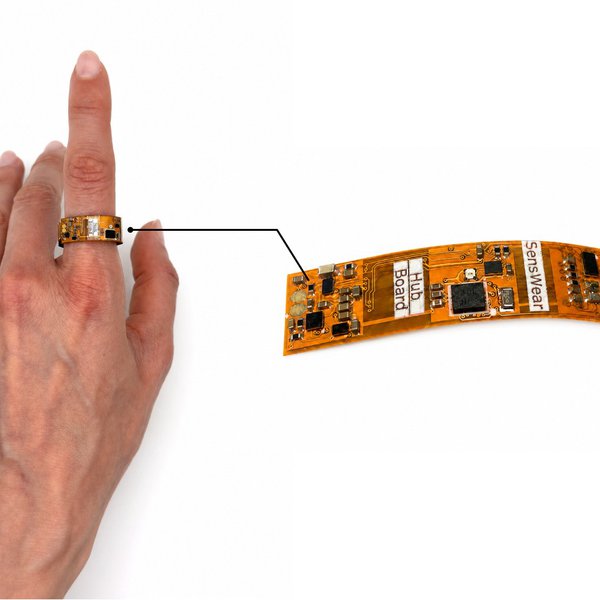
SensWear functions as a distributed, modular wearable system centered around the SensWear Core Hub Board, which houses an nRF54L15 microcontroller for local processing and Bluetooth Low Energy (BLE) wireless communication. Attached directly to the core hub is a BHI360 inertial measurement unit (IMU), providing real-time motion and gesture tracking data. To expand functionality, the platform utilizes interchangeable daughter boards that interface with the core hub to collect diverse data types or provide feedback. These include the MAX30101 for photoplethysmography (PPG) optical sensing, the MAX30208 for precise temperature monitoring, and the MTCH6102 for touch input. For output and user interaction, the system can drive haptic feedback via the DRV2605 controller and illumination using the LP5562 LED driver. Firmware execution and data orchestration are handled by a Zephyr-based configurable firmware stack running on the core hub, allowing developers to stream raw sensor data wirelessly. For physical deployment, the assembled electronics fit into customizable wearable enclosures configured as a ring, wristband, or patch form factor. Finally, the system supports hardware programming and debugging through the Debug Board V2, which is an RP2354A-based Pico-style debugger, while external data logging and analysis are supported by accompanying Python and TypeScript SDKs.
Why Build This
Rapidly prototype custom wearable health-monitoring and gesture-recognition devices without designing bespoke PCBs from scratch.
Develop and deploy advanced edge machine learning algorithms on raw sensor data streams acquired via a Zephyr-based RTOS firmware architecture.
Integrate multiple physiological and motion sensors into compact form factors like smart rings, wristbands, or wearable patches.
Real-World Application
Biometric monitoring, wireless physiological research, smart-ring gesture recognition, and rapid prototyping of custom wearable devices.
Skills You'll Learn
Bluetooth Low Energy (BLE) wireless communication
Real-Time Operating System (RTOS) firmware configuration
sensor integration via I2C or SPI
embedded software development in Zephyr
motion and physiological data acquisition
Safety Precautions
No specific precautions noted for this build — always follow general electronics safety practices.
Technology Tags
WEARABLES
BLE
ZEPHYR RTOS
IMU
PPG
HARDWARE DESIGN
PCB
SENSOR FUSION
EDGE AI
PYTHON
TYPESCRIPT
Frequently Asked Questions
The SensWear platform is modular and designed for expansion, but integrating non-standard sensors requires designing a custom daughter board that physically and electrically matches the Core Hub Board interface, as well as writing custom Zephyr driver firmware.
Firmware development and debugging are performed using the Debug Board V2, an RP2354A-based Pico-style debugger that interfaces directly with the hardware development setup.
You will need experience with C or C++ for configuring the Zephyr-based firmware on the microcontroller, alongside Python or TypeScript if you plan to use the provided SDKs for external data processing and communication.
Gallery
This page is part of Kitkraft's Project Hub — a curated collection of electronics & robotics projects gathered from the maker community to help students and hobbyists discover and learn to build. Kitkraft does not claim authorship of the original project, and makes no representation as to the accuracy, completeness or safety of third-party source material. The summary and "How It Works" explanation above are AI-generated, rewritten with reference to the original tutorial — not a reproduction of it. Full credit and a direct link to the original source are provided above. If you're the original creator and have a concern about how your work is represented here, please contact us and we'll address it promptly.
Kitkraft Project Hub — curated from the maker community, credited at the source.
 MPU6050 - Triple Axis Accelerometer + Gyroscope Module
Rs. 438.00
 400 Points Mini Solderless Prototype PCB Breadboard High Quality
Rs. 89.00
 MB102 Adjustable Breadboard Power Supply Module (3.3V & 5V) for Arduino & Raspberry Pi
Rs. 139.00
 Jumper Wire 10 Pin Male To Male 20cm
Rs. 45.00
 Jumper Wire 10 Pin Male To Female 20cm
Rs. 45.00


