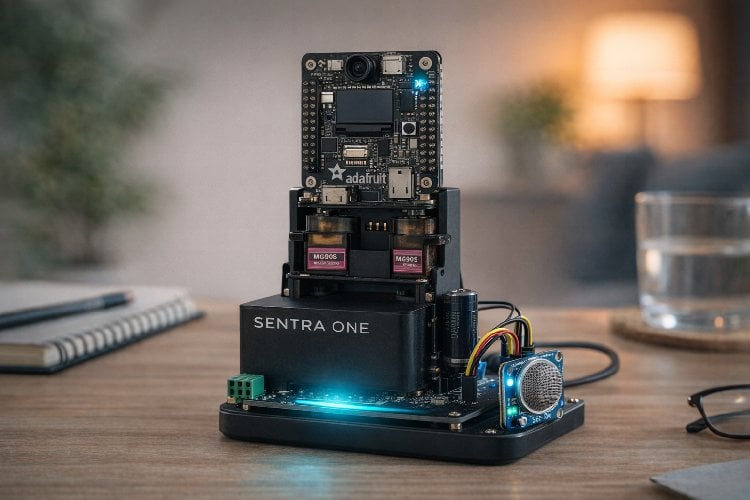
Sentra One is a dual-mode safety and monitoring system that transforms from a portable personal safety device into a docked smart home guardian with servo-controlled camera movement.
This project is sourced from another site, not written by us — this list is our best match of their components against what we stock, not a verified bill of materials. Always check the original blog (linked above) for the actual parts list before buying.
The Sentra One-Smart Modular Guardian operates as a dual-mode safety, monitoring, and environmental sensing platform powered by an ESP32 or ESP32-S3 microcontroller. At its core, the system orchestrates multiple subsystems for both portable and stationary operation. For visual capture and logging, the Adafruit Memento Board interfaces with a 16GB Micro SD card to record image or sensor data locally. When docked, the system interfaces via 6-pin pogo connectors to receive stable power from a 5V 2A Adapter, while a 420mAh battery provides auxiliary or portable power when undocked. Motion control is handled by two MG995 servo motors, which receive Pulse Width Modulation (PWM) signals from the ESP32 to pan and tilt the camera module, providing active mechanical tracking capabilities. Simultaneously, environmental conditions are monitored by an MQ-135 Gas Sensor, which detects various gases in the surrounding air and outputs analog data to the microcontroller for continuous evaluation. Programmed primarily using Arduino C and the Arduino IDE through the Adafruit PyCamera Library—with optional CircuitPython support for later development phases—the microcontroller processes sensor readings, drives the servo motors to designated angles, manages power states, and executes the dual-mode logic that allows the device to transition seamlessly from a mobile personal safety tool to a stationary home surveillance guardian.
Why Build This
Design and implement a dual-mode electromechanical system that transitions between portable safety and stationary home monitoring.
Integrate optical capture hardware, environmental sensors, and PWM-driven servo mechanisms into a single cohesive microcontroller architecture.
Develop advanced firmware combining sensor data acquisition, local Micro SD card logging, and mechanical motion control for undergraduate engineering portfolios.
Real-World Application
Elderly and child care, personal safety on the go, and home surveillance monitoring through a single convertible device.
Skills You'll Learn
PWM servo motor control
analog sensor integration
embedded data logging with Micro SD cards
power management and modular docking via pogo connectors
camera library implementation
dual-mode firmware architecture
Safety Precautions
Ensure proper decoupling capacitors (such as 1000µF) are placed across power rails near servo motors to prevent brownout conditions and voltage drops.
Technology Tags
ESP32-S3
ARDUINO IDE
CIRCUITPYTHON
SERVO MOTORS
POGO PINS
GAS SENSOR
CAMERA
WI-FI
Frequently Asked Questions
The system utilizes 6-pin pogo connectors to establish physical and electrical contact when placed on the dock, allowing it to transition between the internal 420mAh battery and the external 5V 2A Adapter.
Yes, CircuitPython is supported as an optional or next-phase software environment alongside the primary Arduino IDE and Arduino C workflow.
MG995 servos draw significant current spikes during movement, which can cause voltage sags or brownouts on the microcontroller rails if proper decoupling components like a 1000µF capacitor are not used.
Gallery
This page is part of Kitkraft's Project Hub — a curated collection of electronics & robotics projects gathered from the maker community to help students and hobbyists discover and learn to build. Kitkraft does not claim authorship of the original project, and makes no representation as to the accuracy, completeness or safety of third-party source material. The summary and "How It Works" explanation above are AI-generated, rewritten with reference to the original tutorial — not a reproduction of it. Full credit and a direct link to the original source are provided above. If you're the original creator and have a concern about how your work is represented here, please contact us and we'll address it promptly.
Kitkraft Project Hub — curated from the maker community, credited at the source.
 TowerPro SG90 Mini Servo – 180 degree Rotation – Standard Quality
Rs. 179.00
 MQ-2 Smoke Sensor Detector Module
Rs. 129.00
 MB102 Adjustable Breadboard Power Supply Module (3.3V & 5V) for Arduino & Raspberry Pi
Rs. 139.00
 400 Points Mini Solderless Prototype PCB Breadboard High Quality
Rs. 89.00
 Jumper Wire 10 Pin Male To Male 20cm
Rs. 45.00
 Jumper Wire 10 Pin Male To Female 20cm
Rs. 45.00


