A fully local, router-free smart home hub built using ESP32-S3 that integrates touchscreen control, environmental sensing, live video streaming, and voice/IR automation.
This project is sourced from another site, not written by us — this list is our best match of their components against what we stock, not a verified bill of materials. Always check the original blog (linked above) for the actual parts list before buying.
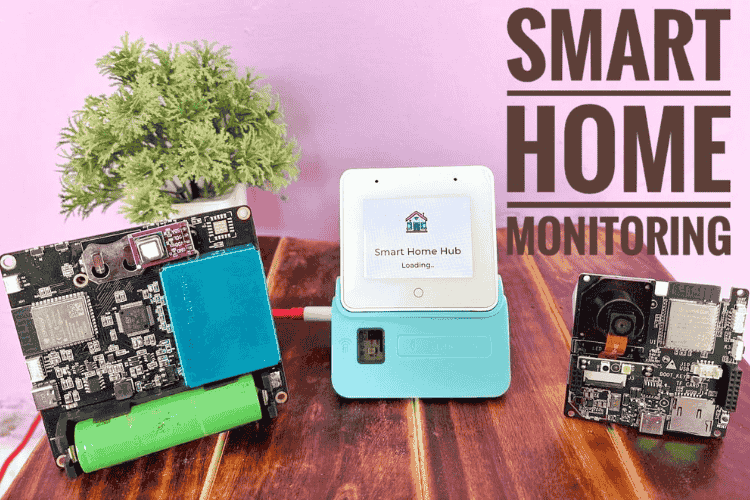
The Smart Home Automation & Monitoring Hub operates as a decentralized, fully local ecosystem leveraging the processing power and wireless capabilities of multiple microcontroller modules centered around the ESP32-S3 architecture. At the core of the user interface is the ESP32-S3-BOX-3, which utilizes the LVGL graphics library to render interactive menus and graphics on an integrated touchscreen, alongside handling voice and infrared automation commands. Environmental data is gathered continuously by the Custom Sensor Hub, which pairs an ESP32-S3 and STM32 architecture to interface with a sophisticated array of environmental sensors: the PM7003 for particulate matter, SCD40 for carbon dioxide, LTR390 for UV and ambient light, and the BME688 for gas, temperature, humidity, and pressure monitoring. Meanwhile, the ESP32-S3-CAM module provides live video streaming capabilities over the local network, and an additional ESP32-C3 Dev Module operates as a satellite node for auxiliary control tasks. The entire software stack is compiled and flashed using Visual Studio Code with the ESP-IDF extension, Python, and the Arduino IDE, allowing these disparate hardware blocks to communicate and execute automation routines entirely router-free and off the cloud.
Why Build This
Design and deploy a completely offline, privacy-centric residential automation network that operates independently of cloud servers and external internet connectivity.
Integrate heterogeneous microcontroller architectures (ESP32-S3, ESP32-C3, and STM32) with a complex sensor array to monitor indoor air quality, environmental factors, and security video feeds.
Implement an advanced embedded graphical user interface (GUI) using LVGL on a touchscreen device alongside custom voice and IR control pipelines.
Real-World Application
Local, privacy-focused smart home automation systems for residential spaces, off-grid cabins, or areas with unreliable internet connectivity.
Skills You'll Learn
Embedded GUI development with LVGL
multi-microcontroller network communication
environmental sensor data acquisition
I2C and UART protocol implementation
live video streaming over Wi-Fi
infrared and voice command processing
firmware development using ESP-IDF and Arduino IDE
Safety Precautions
No specific precautions noted for this build — always follow general electronics safety practices.
Technology Tags
ESP32
ESP-NOW
WI-FI
LVGL
IOT
VOICE RECOGNITION
TOUCHSCREEN
EMBEDDED SYSTEMS
Frequently Asked Questions
No. The system is designed to be fully local and router-free, operating entirely within its own localized network environment without relying on external cloud services.
You will use Visual Studio Code with the ESP-IDF Extension (V5.1.6), Python, and the Arduino IDE to write, compile, and flash firmware across the ESP32 and STM32 components.
The user interface is powered by the LVGL graphics library, rendering custom touch controls and sensor readouts directly on the ESP32-S3-BOX-3 touchscreen display.
Gallery
This page is part of Kitkraft's Project Hub — a curated collection of electronics & robotics projects gathered from the maker community to help students and hobbyists discover and learn to build. Kitkraft does not claim authorship of the original project, and makes no representation as to the accuracy, completeness or safety of third-party source material. The summary and "How It Works" explanation above are AI-generated, rewritten with reference to the original tutorial — not a reproduction of it. Full credit and a direct link to the original source are provided above. If you're the original creator and have a concern about how your work is represented here, please contact us and we'll address it promptly.
Kitkraft Project Hub — curated from the maker community, credited at the source.
 ESP32-C3 Development Board with Berg Pins - Unsoldered
Rs. 390.00
 400 Points Mini Solderless Prototype PCB Breadboard High Quality
Rs. 89.00
 MB102 Adjustable Breadboard Power Supply Module (3.3V & 5V) for Arduino & Raspberry Pi
Rs. 139.00
 Jumper Wire 10 Pin Male To Male 20cm
Rs. 45.00
 Jumper Wire 10 Pin Male To Female 20cm
Rs. 45.00


