This project is sourced from another site, not written by us — this list is our best match of their components against what we stock, not a verified bill of materials. Always check the original blog (linked above) for the actual parts list before buying.
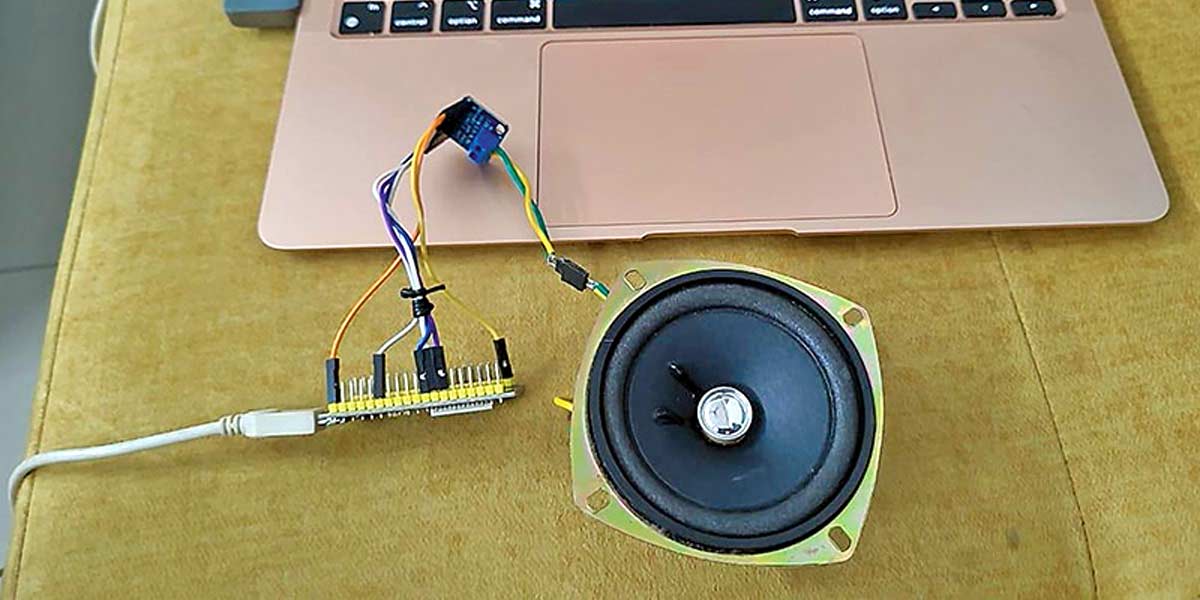
This intermediate text-to-speech system operates by leveraging the processing power of the ESP32 microcontroller to handle digital audio data streams and transmit them through an I2S communication protocol. The ESP32 acts as the central master device, running code written in the Arduino IDE supported by libraries such as Audio.h, Audio.cpp, DAC.h, and DAC.cpp. Power is supplied reliably to the entire circuit via a 5V USB power supply cable, ensuring stable operation for both the microcontroller and the output stage. As the ESP32 processes textual or audio stream data, it outputs digital audio signals via its I2S interface directly to the MAX98357A I2S 3-watt Class D amplifier. The MAX98357A takes this digital audio input, efficiently converts it, and amplifies the signal to drive a physical 3-watt speaker. Because Class D amplifiers use pulse-width modulation techniques to switch power transistors rapidly, the system delivers high efficiency audio output without generating excessive heat. The resulting acoustic soundwaves allow the device to successfully convert processed text data into audible speech in real time.
Why Build This
Develop custom voice assistants and interactive smart home alert devices.
Implement automated announcement systems for campus or industrial automation.
Design and prototype accessibility tools and auditory feedback devices for the visually impaired.
Real-World Application
Voice assistants, automated announcement systems, smart home alerts, and accessibility tools for the visually impaired.
Skills You'll Learn
I2S digital audio communication
Class D amplifier integration
microcontroller firmware development
digital-to-analog signal processing
power distribution management
Safety Precautions
Ensure the speaker’s positive and negative terminals are connected correctly to avoid audio distortion and potential damage to the amplifier.
Technology Tags
ESP32
MAX98357A
I2S
AUDIO
TEXT-TO-SPEECH
GOOGLE API
Frequently Asked Questions
A stable 5V USB power supply cable connected to a reliable USB port or adapter is necessary to provide sufficient current for both the ESP32 and the 3-watt amplifier.
The ESP32 digital output pins cannot supply enough current or proper analog drive to power a 3-watt speaker directly; the MAX98357A bridges the digital audio stream to a drivable amplified output.
No, this project specifically relies on digital I2S communication and the provided Audio and DAC libraries to stream data properly to the MAX98357A amplifier.
Gallery
This page is part of Kitkraft's Project Hub — a curated collection of electronics & robotics projects gathered from the maker community to help students and hobbyists discover and learn to build. Kitkraft does not claim authorship of the original project, and makes no representation as to the accuracy, completeness or safety of third-party source material. The summary and "How It Works" explanation above are AI-generated, rewritten with reference to the original tutorial — not a reproduction of it. Full credit and a direct link to the original source are provided above. If you're the original creator and have a concern about how your work is represented here, please contact us and we'll address it promptly.
Kitkraft Project Hub — curated from the maker community, credited at the source.
 ESP32 WiFi+Bluetooth CP2102 Development Board
Rs. 520.00
 MB102 Adjustable Breadboard Power Supply Module (3.3V & 5V) for Arduino & Raspberry Pi
Rs. 139.00
 400 Points Mini Solderless Prototype PCB Breadboard High Quality
Rs. 89.00
 Jumper Wire 10 Pin Male To Male 20cm
Rs. 45.00
 Jumper Wire 10 Pin Male To Female 20cm
Rs. 45.00


