This project is sourced from another site, not written by us — this list is our best match of their components against what we stock, not a verified bill of materials. Always check the original blog (linked above) for the actual parts list before buying.
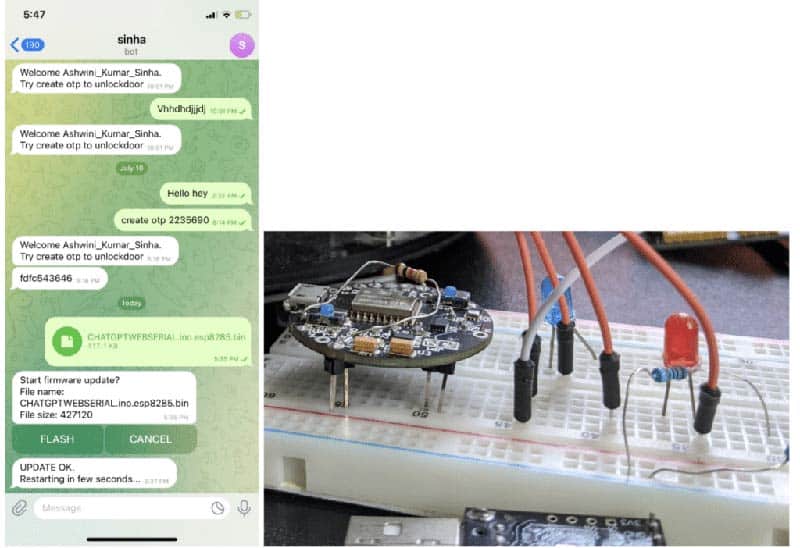
This project establishes a wireless Over-The-Air (OTA) firmware update system for an ESP32 or ESP8266 WiFi microcontroller, allowing you to deploy new code without physically accessing the device. The ESP microcontroller connects to your local wireless network, bridging the physical IoT hardware with the Telegram messaging platform through the AsyncTelegram library. Initially, the microcontroller is programmed via the Arduino IDE using an FTDI USB to TTL converter and connecting wires to establish the baseline firmware and communication credentials. Once deployed in the field, the microcontroller runs an asynchronous routine that constantly checks for incoming messages from a designated Telegram Bot API. When a developer uploads a compiled binary firmware file (.bin) directly to the Telegram chat, the ESP microcontroller intercepts this file over the internet. The device downloads the new binary package into a specific reserved partition of its internal flash memory using its built-in OTA update routines. After validating the integrity of the downloaded image, the system automatically writes the new firmware over the old program code and reboots itself. This entire remote process enables seamless software maintenance and feature deployment entirely through a smartphone or desktop messaging application, bypassing the need for physical serial connections after the initial deployment.
Why Build This
Eliminate physical intervention for maintenance when deploying IoT nodes in hard-to-reach industrial environments like towers, mines, and utility poles.
Streamline the engineering workflow by utilizing a widely accessible messaging app interface (Telegram) for continuous deployment and remote firmware management.
Gain practical experience in implementing secure network-based bootloaders and asynchronous communication protocols on resource-constrained microcontrollers.
Real-World Application
Remote deployment and maintenance of IoT and IIoT devices located in hard-to-reach places such as industrial towers, mines, subway pillars, and high poles without requiring physical intervention.
Skills You'll Learn
Wireless OTA firmware flashing
Telegram Bot API integration
Asynchronous network programming
Microcontroller partition management
Serial debugging with FTDI interfaces
Safety Precautions
No specific precautions noted for this build — always follow general electronics safety practices.
Technology Tags
IOT
OTA FIRMWARE UPDATE
TELEGRAM BOT
WI-FI
MICROCONTROLLER
EMBEDDED SYSTEMS
ASYNCTELEGRAM LIBRARY
Frequently Asked Questions
No. The FTDI USB to TTL converter is only required for the initial flashing of the baseline firmware. Subsequent updates are performed entirely over-the-air via Telegram.
If the connection fails mid-download, advanced ESP memory partitioning often retains the previous stable firmware image to prevent bricking, though care should be taken to ensure stable power during writes.
You should configure your Telegram Bot and firmware code to restrict access to your specific authorized user ID or chat ID, preventing unauthorized individuals from pushing malicious code to your device.
Gallery
This page is part of Kitkraft's Project Hub — a curated collection of electronics & robotics projects gathered from the maker community to help students and hobbyists discover and learn to build. Kitkraft does not claim authorship of the original project, and makes no representation as to the accuracy, completeness or safety of third-party source material. The summary and "How It Works" explanation above are AI-generated, rewritten with reference to the original tutorial — not a reproduction of it. Full credit and a direct link to the original source are provided above. If you're the original creator and have a concern about how your work is represented here, please contact us and we'll address it promptly.
Kitkraft Project Hub — curated from the maker community, credited at the source.
 USB to UART/ESP8266 Adapter Programmer for ESP-01 WiFi Modules with CH340G Chip
Rs. 99.00
 Jumper Wire 10 Pin Male To Male 20cm
Rs. 45.00
 400 Points Mini Solderless Prototype PCB Breadboard High Quality
Rs. 89.00
 MB102 Adjustable Breadboard Power Supply Module (3.3V & 5V) for Arduino & Raspberry Pi
Rs. 139.00
 Jumper Wire 10 Pin Male To Female 20cm
Rs. 45.00


