Project Hub/IoT & Connected Devices/Telemetry & Remote Logging/Automatic Certificate Generation Using Python
Intermediate
AI / ML
< ₹500
3 – 6 Hours
Automatic Certificate Generation Using Python
An automated project that uses Python on Google Colab to generate customized certificates from a Google Sheet and a blank certificate image template.
Originally published by Vijaykumar Sajjanar on ElectronicsForU
View original tutorial
How It Works
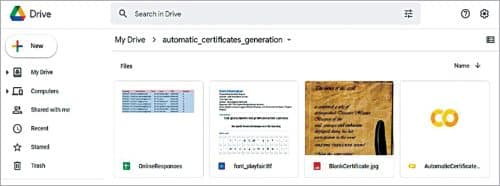
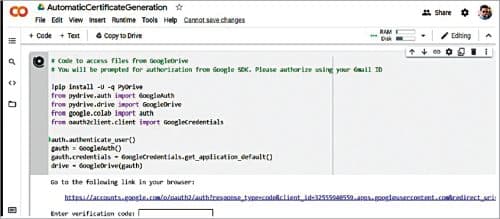
This automated workflow functions by leveraging cloud-based software tools to process tabular data and merge it with a visual template. The system relies on a Google Sheet to store recipient details, such as names and completion data, organized in rows and columns. Using a Jupyter Notebook environment hosted on Google Colab, a Python script executes remotely in the browser without requiring local software installations. The script establishes a connection to the internet to access the Google Sheet data programmatically using appropriate Python libraries. Once the names and details are loaded into the runtime memory, the script opens a blank certificate image template. It then utilizes image processing modules to overlay the dynamic text onto the designated coordinates of the certificate image. For every entry found in the spreadsheet, the script generates a customized, rendering-ready certificate file. Throughout this process, the computer or mobile device acts as the client interface, displaying the browser-based development environment while remote cloud servers handle the computational data processing.
Why Build This
Automating bulk certificate generation for academic workshops, webinars, and university hackathons.
Streamlining administrative workflows for student organizations managing large online courses or events.
Practicing cloud-based data handling and scripting techniques applicable to professional software engineering.
Real-World Application
Automating bulk certificate generation for webinars, workshops, academic events, and online courses.
Skills You'll Learn
Data parsing
cloud-based scripting
automated image processing
spreadsheet integration
programmatic text rendering
Safety Precautions
No specific precautions noted for this build — always follow general electronics safety practices.
Technology Tags
PYTHON
GOOGLE COLAB
CLOUD COMPUTING
AUTOMATION
JUPYTER NOTEBOOK
Ready to build this?
We stock the boards, sensors and modules this project needs. A full parts list is coming soon — for now, browse our DIY Kits & components or search for AI / ML parts.
Frequently Asked Questions
Do I need to install Python locally on my computer?
No, the project runs inside Google Colab, which executes Python code in a web browser using cloud resources.
What format does the certificate template need to be?
The template should be a standard image file format, such as PNG or JPEG, that Python image processing libraries can read and modify.
How does the Python script access my Google Sheet?
The script uses specific Python libraries and authentication methods to fetch data directly from the online spreadsheet via the internet.
Gallery




Kitkraft Project Hub — curated from the maker community, credited at the source.
PRJ-00541