Project Hub/Audio Displays & Interactive Media/LED Matrix & Cube Displays/Building Low Cost DIY Spectrometer using Raspberry Pi at Home
Advanced
RASPBERRY PI
Project Specific
3 – 6 Hours
Building Low Cost DIY Spectrometer using Raspberry Pi at Home
Build a low-cost DIY spectrometer using a Raspberry Pi and an AS7341 spectral sensor for real-time spectral analysis spanning visible and Near InfraRed (NIR) ranges.
Originally published by Ashwini Sinha on ElectronicsForU
View original tutorial
How It Works
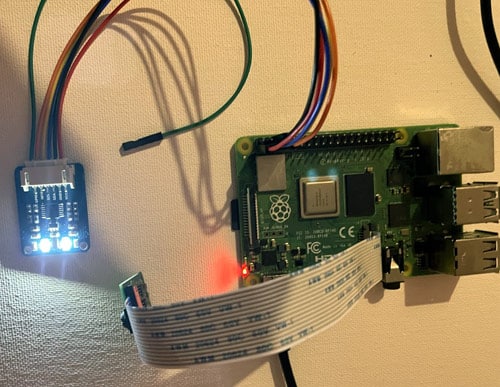
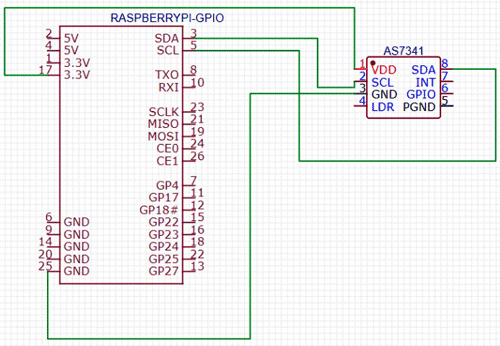
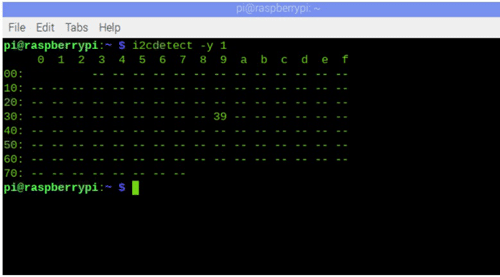
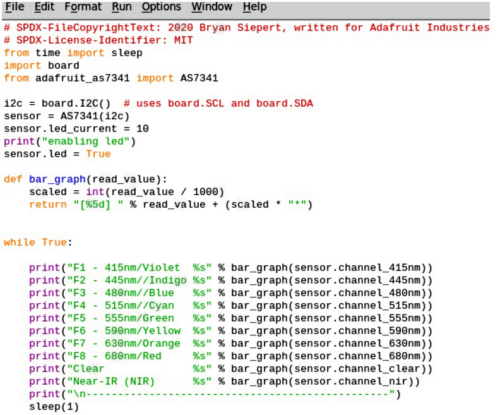
This project creates a portable spectral analysis system by interfacing an AS7341 spectral sensor with a Raspberry Pi running Python. The AS7341 is a multi-channel spectrometer device designed to quantify light intensity across specific visible and Near-Infrared (NIR) wavelengths. It connects to the Raspberry Pi using standard connecting wires to establish an I2C communication interface, allowing the host board to configure the sensor and retrieve raw light measurement data. Operating under Raspbian OS, a Python script utilizing the adafruit-circuitpython-as7341 library communicates with the sensor's internal analog-to-digital converters. When exposed to a light source reflected from or transmitted through a sample, the sensor captures discrete spectral bands simultaneously. The Raspberry Pi then processes these numerical intensity values in real time, enabling the system to evaluate the precise spectral signature of the target object. This setup eliminates the need for expensive laboratory benchtop spectrometers by leveraging the computational power of the Raspberry Pi 5 and the precision of modern solid-state optical sensing.
Why Build This
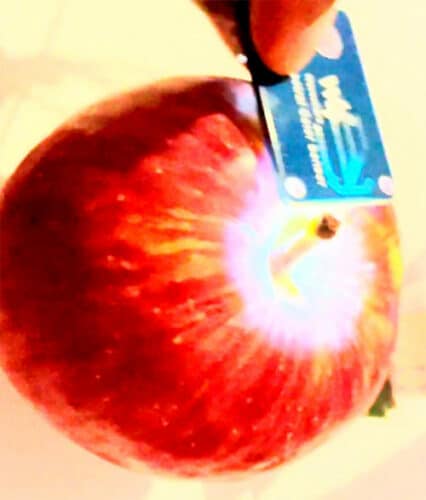
Perform non-destructive testing for agricultural applications such as evaluating fruit ripeness and analyzing dairy bio-constituents.
Implement industrial-grade color tuning and paint color verification workflows using precise spectral data.
Gain hands-on experience designing optical data acquisition systems suitable for undergraduate engineering research.
Real-World Application
Real-time spectral analysis for testing fruit ripeness, milk and bio-constituent analysis, checking paint colors, and industrial production color tuning.
Skills You'll Learn
I2C communication protocol
Python sensor library integration
optical spectral analysis
hardware-software system integration
data acquisition and processing
Safety Precautions
No specific precautions noted for this build — always follow general electronics safety practices.
Technology Tags
PYTHON
I2C
AS7341
SPECTROSCOPY
NIR
UV-VIS
SENSORS
Ready to build this?
We stock the boards, sensors and modules this project needs. A full parts list is coming soon — for now, browse our DIY Kits & components or search for Raspberry Pi parts.
Frequently Asked Questions
Can I use an older Raspberry Pi model instead of the Raspberry Pi 5?
Yes, any Raspberry Pi model featuring a standard 40-pin GPIO header and I2C support can run this project using Raspbian OS and Python 3.
What exact library is needed to read data from the AS7341 sensor?
The project uses the adafruit-circuitpython-as7341 Python library, which handles the complex register communication with the sensor over I2C.
Does this spectrometer require any specialized optical calibration?
While basic measurements can be taken out-of-the-box, accurate quantitative analysis often requires taking a reference dark and white reading to calibrate the raw channel intensities.
Gallery
Kitkraft Project Hub — curated from the maker community, credited at the source.
PRJ-00627