This project is sourced from another site, not written by us — this list is our best match of their components against what we stock, not a verified bill of materials. Always check the original blog (linked above) for the actual parts list before buying.
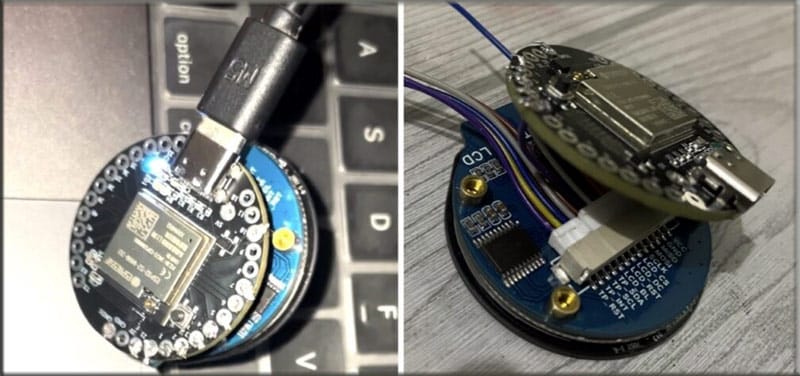
This DIY smartwatch project transforms the compact IndusBoard Coin microcontroller development board into a wearable Human Interface Device (HID) capable of interacting with computers, tablets, and smartphones via Bluetooth. The system is built around the IndusBoard Dev Board, which features an ESP32-based architecture equipped with native Bluetooth and USB capabilities. Visual output and user input are managed by a round touch display utilizing the GC9A01 driver for graphics rendering and the CST816S capacitive touch driver for gesture and touch recognition. When assembled, the IndusBoard communicates with the round display to render a graphical user interface featuring virtual keys and trackpad zones. The user interacts with these on-screen elements through the capacitive touch panel. The underlying firmware, developed using the Arduino IDE along with the TFT-espi library and CST816S touch driver library, processes these touch events. Leveraging the ESP32 board SDK's built-in HID library, the microcontroller translates user touches into standard keyboard strokes and mouse movements. These HID commands are then transmitted wirelessly via Bluetooth to a host device, allowing the wearable gadget to function seamlessly as a remote presentation clicker, mini keyboard, or trackpad mouse without requiring custom host-side drivers.
Why Build This
Design a custom wearable human-machine interface that bridges embedded microcontrollers with everyday consumer electronics via Bluetooth HID protocols.
Gain hands-on experience integrating round touch displays and capacitive touch drivers into a constrained, wearable form factor.
Develop practical firmware combining graphics rendering libraries and wireless stack communication for remote device control.
Real-World Application
Controlling computers, tablets, and smartphones remotely as a wearable presentation clicker, mini keyboard, or trackpad mouse.
Skills You'll Learn
Embedded firmware development
Bluetooth HID profile implementation
capacitive touch driver integration
display graphics rendering
hardware assembly and integration
Safety Precautions
No specific precautions noted for this build — always follow general electronics safety practices.
Technology Tags
ESP32
ARDUINO
BLUETOOTH HID
WEARABLE
TOUCH DISPLAY
SPI
I2C
GC9A01
CST816S
Frequently Asked Questions
Yes, the IndusBoard is compatible with the Arduino IDE using the ESP32 board SDK to upload and manage your project code.
The project uses the ESP32's built-in Bluetooth HID library to connect wirelessly to host devices as a standard keyboard and mouse.
You will need the TFT-espi library for rendering graphics on the GC9A01 driver display and the CST816S touch driver library to process capacitive touch inputs.
Gallery
This page is part of Kitkraft's Project Hub — a curated collection of electronics & robotics projects gathered from the maker community to help students and hobbyists discover and learn to build. Kitkraft does not claim authorship of the original project, and makes no representation as to the accuracy, completeness or safety of third-party source material. The summary and "How It Works" explanation above are AI-generated, rewritten with reference to the original tutorial — not a reproduction of it. Full credit and a direct link to the original source are provided above. If you're the original creator and have a concern about how your work is represented here, please contact us and we'll address it promptly.
Kitkraft Project Hub — curated from the maker community, credited at the source.
 MB102 Adjustable Breadboard Power Supply Module (3.3V & 5V) for Arduino & Raspberry Pi
Rs. 139.00
 TTP223 Touch Sensor (Blue PCB)
Rs. 39.00
 400 Points Mini Solderless Prototype PCB Breadboard High Quality
Rs. 89.00
 Jumper Wire 10 Pin Male To Male 20cm
Rs. 45.00
 Jumper Wire 10 Pin Male To Female 20cm
Rs. 45.00


