LittleFS with ESP8266 to Read, Write and Delete Data on Flash Memory of NodeMCU
Project Hub
/IoT & Connected Devices/Smart Agriculture & Precision Farming/LittleFS with ESP8266 to Read, Write and Delete Data on Flash Memory of NodeMCU
Intermediate
ARDUINO
₹500 – ₹1,500
3 – 6 Hours
Partial Kit
LittleFS with ESP8266 to Read, Write and Delete Data on Flash Memory of NodeMCU
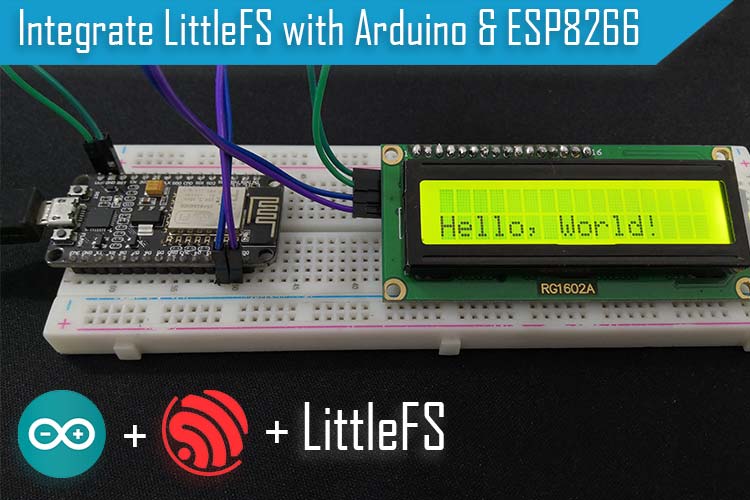
Learn how to utilize the LittleFS file system on an ESP8266 NodeMCU to read, write, and delete non-volatile data on flash memory, displayed via an I2C 16x2 LCD.
This project is sourced from another site, not written by us — this list is our best match of their components against what we stock, not a verified bill of materials. Always check the original blog (linked above) for the actual parts list before buying.
This project integrates the ESP8266 NodeMCU's onboard flash memory with an I2C 16x2 LCD display to perform file-based data operations using the LittleFS file system. The ESP8266 features a robust microcontroller with integrated Wi-Fi and a large portion of its flash memory dedicated to user files. By utilizing the LittleFS library, the microcontroller can mount this flash memory to create, read, write, and delete files directly on the hardware without needing an external SD card. The I2C module (using the PC8574T chip) simplifies the wiring between the NodeMCU and the 16x2 LCD display by converting the serial I2C protocol—requiring only two data lines (SDA and SCL) plus power—into the parallel signals needed by the screen. When the system boots up, the NodeMCU mounts the LittleFS partition, executes file writing or reading routines, and updates the state on the connected display. Power is distributed across a standard breadboard using jumper wires, connecting the NodeMCU's 3.3V or 5V rails, ground, and I2C pins to the LCD display module. This architecture allows an undergraduate engineering system to manage persistent variables, configuration parameters, or logged sensor states locally on the flash memory, displaying operational statuses in real time on the LCD screen.
Why Build This
Implement reliable local data logging and configuration saving for embedded IoT architectures without depending entirely on external cloud infrastructure.
Manage non-volatile memory partitions using LittleFS to efficiently read, write, and delete files directly on an ESP8266 microcontroller.
Interface an I2C 16x2 LCD display with a microcontroller to output real-time system status and file operation feedback using minimal GPIO pins.
Real-World Application
Local data logging, configuration saving, and offline state retention for IoT devices without relying solely on external cloud databases or limited EEPROM.
Skills You'll Learn
LittleFS file system management
I2C communication protocol
LCD character display interfacing
non-volatile flash memory handling
embedded data logging
Safety Precautions
No specific precautions noted for this build — always follow general electronics safety practices.
Technology Tags
ESP8266
NODEMCU
LITTLEFS
FLASH MEMORY
I2C
16X2 LCD
ARDUINO IDE
NON-VOLATILE MEMORY
Frequently Asked Questions
LittleFS is specifically designed for flash memory, offering wear-leveling and a hierarchical file structure that handles larger datasets and frequent writes much better than traditional byte-limited EEPROM.
No. The project utilizes the onboard flash memory of the ESP8266 NodeMCU, accessed and managed virtually through the LittleFS library.
The PC8574T I2C backpack converts the standard multi-wire parallel interface of the LCD into a simple 2-wire serial bus (SDA and SCL), significantly reducing the number of required jumper wires.
Gallery
This page is part of Kitkraft's Project Hub — a curated collection of electronics & robotics projects gathered from the maker community to help students and hobbyists discover and learn to build. Kitkraft does not claim authorship of the original project, and makes no representation as to the accuracy, completeness or safety of third-party source material. The summary and "How It Works" explanation above are AI-generated, rewritten with reference to the original tutorial — not a reproduction of it. Full credit and a direct link to the original source are provided above. If you're the original creator and have a concern about how your work is represented here, please contact us and we'll address it promptly.
 NodeMCU ESP8266 WIFI development board based on CP2102
Rs. 660.00
 MB102 Adjustable Breadboard Power Supply Module (3.3V & 5V) for Arduino & Raspberry Pi
Rs. 139.00
 Jumper Wire 10 Pin Male To Male 20cm
Rs. 45.00
 400 Points Mini Solderless Prototype PCB Breadboard High Quality
Rs. 89.00
 Jumper Wire 10 Pin Male To Female 20cm
Rs. 45.00


