Build an inexpensive smart wireless biometric lock using an Arduino, a Bluetooth module, a servo motor, and a custom Android app built on Kodular that utilizes your smartphone's built-in fingerprint sensor.
This project is sourced from another site, not written by us — this list is our best match of their components against what we stock, not a verified bill of materials. Always check the original blog (linked above) for the actual parts list before buying.
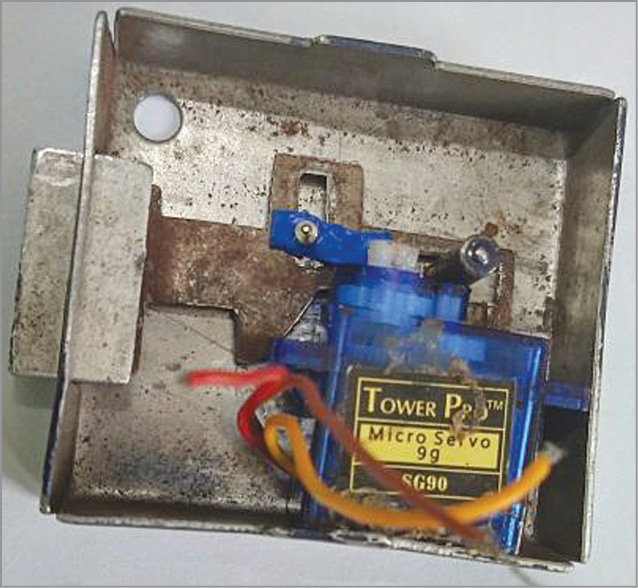
This smart wireless biometric lock system operates by bridging mobile app logic with a physical microcontroller-based circuit. At the heart of the system is an Arduino Uno, which continuously monitors for incoming wireless data. The user interacts with a custom Android application built via Kodular on a smartphone, which features a fingerprint scanner integration. When a user places their finger on the smartphone's built-in biometric sensor, the phone authenticates the print and wirelessly transmits a specific command string over a short-range wireless connection using an HC-05 Bluetooth module. The Arduino board receives this serial data via its RX/TX lines and processes the incoming instruction. Upon recognizing the valid authentication command, the Arduino outputs a specific Pulse Width Modulation (PWM) signal to a connected servo motor. The servo motor acts as the physical actuator, rotating its output horn by a predetermined angle to move a connected mechanical lock into an unlocked position. Power is supplied to the entire circuit through an external power supply, which ensures that both the logic board and the higher-current servo motor receive adequate electrical energy to function without causing voltage drops on the microcontroller's logic rails. Jumper wires are used to route power, ground, and signal lines between the Arduino Uno, the HC-05 module, and the servo motor, completing the closed-loop access control system.
Why Build This
Design and prototype a cost-effective, IoT-enabled access control system suitable for engineering portfolios and smart home applications.
Gain practical experience in full-stack integration by combining mobile app development, wireless serial communication, and microcontroller actuation.
Implement biometrics in hardware projects without needing expensive dedicated fingerprint scanner modules by leveraging smartphone sensors.
Real-World Application
Smart home access control, secure cabinets, keyless room entry, and low-cost security prototypes.
Skills You'll Learn
Bluetooth serial communication
Microcontroller serial parsing
Pulse Width Modulation servo control
Mobile app UI and logic design
Hardware power distribution
Safety Precautions
Ensure correct voltage supply to the servo motor and Bluetooth module to avoid component damage. Secure mechanical connections properly so the servo motor does not jam.
Technology Tags
ARDUINO
BLUETOOTH
SERVO MOTOR
ANDROID
KODULAR
BIOMETRIC SECURITY
WIRELESS COMMUNICATION
Frequently Asked Questions
The project specifies Kodular, an Android app development platform, and relies on an HC-05 Bluetooth module which typically pairs more easily with Android. iOS compatibility would require modifying the app platform and potentially changing the Bluetooth module to a BLE-compatible alternative.
Servo motors draw significantly more current when moving and under load than the Arduino board's onboard voltage regulator can safely supply. Drawing motor power directly from the Arduino can cause voltage sags, leading to unexpected microcontroller resets or erratic behavior.
The smartphone communicates wirelessly via the HC-05 Bluetooth module, which connects to the Arduino's hardware or software serial pins. The custom app sends simple character strings over this serial link when a fingerprint is successfully recognized.
Gallery
This page is part of Kitkraft's Project Hub — a curated collection of electronics & robotics projects gathered from the maker community to help students and hobbyists discover and learn to build. Kitkraft does not claim authorship of the original project, and makes no representation as to the accuracy, completeness or safety of third-party source material. The summary and "How It Works" explanation above are AI-generated, rewritten with reference to the original tutorial — not a reproduction of it. Full credit and a direct link to the original source are provided above. If you're the original creator and have a concern about how your work is represented here, please contact us and we'll address it promptly.
 TowerPro SG90 Mini Servo – 180 degree Rotation – Standard Quality
Rs. 179.00
 ESP32 WiFi+Bluetooth CP2102 Development Board
Rs. 520.00
 AS608 Optical fingerprint reader module sensor
Rs. 1,500.00
 Jumper Wire 10 Pin Male To Male 20cm
Rs. 45.00
 MB102 Adjustable Breadboard Power Supply Module (3.3V & 5V) for Arduino & Raspberry Pi
Rs. 139.00
 400 Points Mini Solderless Prototype PCB Breadboard High Quality
Rs. 89.00
 Jumper Wire 10 Pin Male To Female 20cm
Rs. 45.00


