We stock the boards, sensors and modules this project needs. A full parts list is coming soon — for now, browse our DIY Kits & components or search for AI / ML parts.
This project is sourced from another site, not written by us — this list is our best match of their components against what we stock, not a verified bill of materials. Always check the original blog (linked above) for the actual parts list before buying.
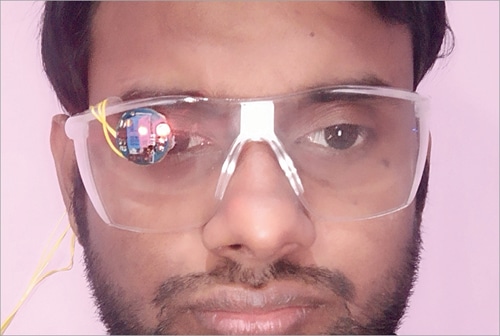
The PC Control With Eye Movement project functions by combining computer vision with physical eyewear prototypes to translate human eye gestures into computer commands. The system utilizes a specialized pair of prototype eyeglasses equipped with mounted eye sensors and a dedicated light source. As the user moves their eyes or blinks, the light source illuminates the eye area, allowing the sensors or a small camera setup to capture these micro-movements. The hardware connects to a PC or laptop running a custom computer vision script built with OpenCV. This software continuously analyzes the video feed or sensor data in real time, detecting shifts in gaze direction or specific blink patterns. Once the script interprets a designated eye movement—such as looking left, right, up, down, or blinking—it translates that visual input into corresponding mouse or keyboard events on the computer operating system. This allows the user to navigate the desktop, select items, and interact with software applications completely hands-free.
Why Build This
Empower physically challenged or paralyzed individuals to independently navigate computers and access digital communication tools.
Gain hands-on experience combining wearable hardware prototypes with OpenCV computer vision software.
Develop a practical assistive technology portfolio project suitable for science fairs and senior secondary engineering demonstrations.
Real-World Application
Assisting paralyzed or physically challenged individuals to independently navigate and operate computers using eye movements.
Skills You'll Learn
Computer vision processing
OpenCV scripting
wearable sensor integration
human-computer interaction
basic assistive technology design
Safety Precautions
No specific precautions noted for this build — always follow general electronics safety practices.
Technology Tags
OPENCV
PYTHON
IMAGE PROCESSING
EYE TRACKING
ASSISTIVE TECHNOLOGY
SENSORS
HUMAN-COMPUTER INTERACTION
Frequently Asked Questions
You will need a lightweight light source and eye sensors (or a compact camera setup) securely mounted to a prototype pair of eyeglasses, wired to your PC or laptop.
The software requirement specifies OpenCV and a custom computer vision script, which are most commonly implemented using Python or C++.
While it falls under an AI/ML platform category, basic OpenCV scripts can rely on traditional image processing techniques like thresholding and contour detection, though machine learning classifiers can be integrated for advanced eye-tracking.
Gallery
This page is part of Kitkraft's Project Hub — a curated collection of electronics & robotics projects gathered from the maker community to help students and hobbyists discover and learn to build. Kitkraft does not claim authorship of the original project, and makes no representation as to the accuracy, completeness or safety of third-party source material. The summary and "How It Works" explanation above are AI-generated, rewritten with reference to the original tutorial — not a reproduction of it. Full credit and a direct link to the original source are provided above. If you're the original creator and have a concern about how your work is represented here, please contact us and we'll address it promptly.