This project is sourced from another site, not written by us — this list is our best match of their components against what we stock, not a verified bill of materials. Always check the original blog (linked above) for the actual parts list before buying.
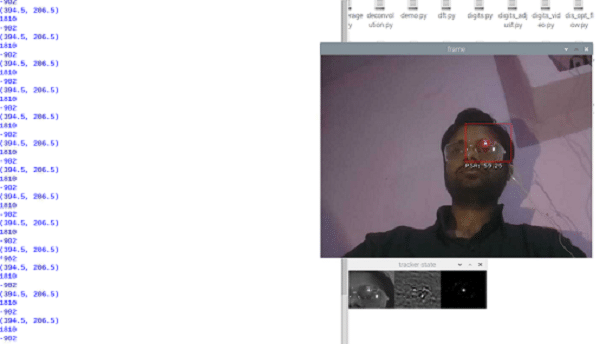
The 'Control PC Using Eyes' project is an assistive technology system that translates human eye movements and blinks into computer commands using computer vision. At the core of the setup is a webcam or sensor camera focused on the user's face to capture real-time video input. A small light is typically mounted on an eyeglass frame to illuminate the eye clearly and reduce shadows, ensuring the camera can reliably track eye features. This video feed is processed by a computer running Python and the OpenCV library. The software uses image processing algorithms to locate the user's face, detect the eyes, and track where the pupil is looking. By analyzing specific visual changes—such as the horizontal and vertical movement of the eyes or the duration and frequency of blinks—the system interprets these gestures as standard mouse or keyboard inputs. For example, a sustained gaze in a certain direction might move the cursor, while a deliberate blink can be programmed to act as a mouse click. Because the processing relies heavily on machine vision libraries rather than complex hardware wiring, the computer handles the heavy lifting of converting optical data into digital device commands, giving physically challenged individuals independent control over a PC.
Why Build This
Develop practical assistive technology solutions that can significantly improve accessibility and independence for individuals with physical disabilities.
Gain hands-on programming experience implementing computer vision and image processing workflows using Python and OpenCV.
Explore human-computer interaction (HCI) concepts by mapping physical gestures directly to digital operating system commands.
Real-World Application
Assistive technology for individuals with neuro conjugate disorders or paralysis to operate computers independently.
Skills You'll Learn
Computer vision programming
Python software development
image processing with OpenCV
webcam data acquisition
gesture recognition logic
assistive technology design
Safety Precautions
No specific precautions noted for this build — always follow general electronics safety practices.
Technology Tags
PYTHON
OPENCV
IMAGE PROCESSING
COMPUTER VISION
FACIAL RECOGNITION
ASSISTIVE TECHNOLOGY
Frequently Asked Questions
Yes, most standard USB webcams or integrated laptop cameras with adequate resolution and frame rate will work, provided the lighting conditions are stable enough for the software to track your eyes.
Not necessarily, as the primary software requirement is OpenCV for computer vision and Python scripting. A basic understanding of Python will help you follow and modify the code logic.
The mounted light helps ensure consistent illumination of the eye, reducing shadows and making it easier for the camera and OpenCV algorithms to accurately track pupil movement.
This page is part of Kitkraft's Project Hub — a curated collection of electronics & robotics projects gathered from the maker community to help students and hobbyists discover and learn to build. Kitkraft does not claim authorship of the original project, and makes no representation as to the accuracy, completeness or safety of third-party source material. The summary and "How It Works" explanation above are AI-generated, rewritten with reference to the original tutorial — not a reproduction of it. Full credit and a direct link to the original source are provided above. If you're the original creator and have a concern about how your work is represented here, please contact us and we'll address it promptly.
 ESP32 CAM WiFi Module Bluetooth with OV2640 Camera
Rs. 810.00
 400 Points Mini Solderless Prototype PCB Breadboard High Quality
Rs. 89.00
 MB102 Adjustable Breadboard Power Supply Module (3.3V & 5V) for Arduino & Raspberry Pi
Rs. 139.00
 Jumper Wire 10 Pin Male To Male 20cm
Rs. 45.00
 Jumper Wire 10 Pin Male To Female 20cm
Rs. 45.00


