Learn how to turn an Android smartphone and a low-cost RTL-SDR USB dongle into a fully functional Software Defined Radio receiver for monitoring various frequency bands.
This project is sourced from another site, not written by us — this list is our best match of their components against what we stock, not a verified bill of materials. Always check the original blog (linked above) for the actual parts list before buying.
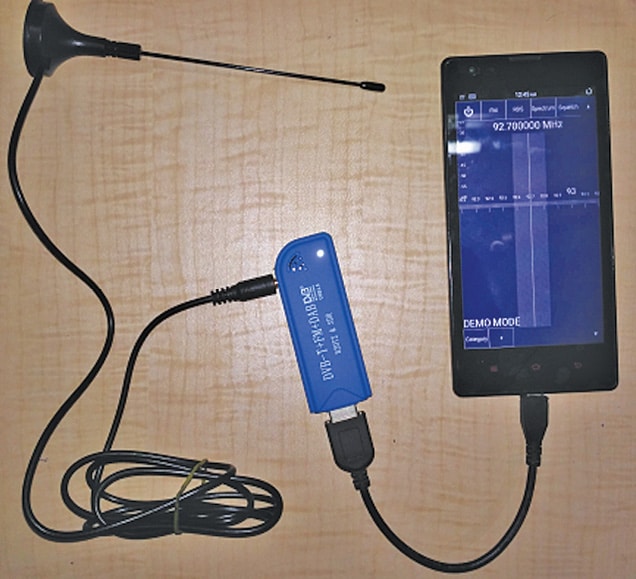
This project transforms an ordinary Android smartphone into a portable Software Defined Radio (SDR) receiver using a compact hardware setup and specialized software. The core receiver hardware is an RTL-SDR USB dongle, which contains an RTL2832U chip and a tuner circuit. This dongle acts as a wideband radio receiver, capturing analog radio frequency signals from the airwaves via an attached antenna. Because a standard smartphone lacks the native drivers and hardware tuning capabilities to process these raw radio waves directly, a USB OTG (On-The-Go) adapter is required to bridge the physical connection between the smartphone's USB port and the RTL-SDR dongle. Once connected, power is supplied to the dongle through the phone, and the RTL-SDR driver software allows the Android operating system to communicate with the external USB receiver. Finally, the SDRTouch application processes the incoming stream of radio frequency data, demodulating and converting the signals into audible audio or visual spectrum displays in real time. By shifting complex demodulation tasks from dedicated hardware to smartphone software, you achieve a versatile and highly portable scanning tool capable of tuning into various broadcast frequencies.
Why Build This
Explore digital communications and radio frequency spectrum analysis hands-on without needing expensive laboratory test equipment.
Listen to local AM and FM broadcasts or monitor amateur radio bands directly on your portable Android device.
Gain practical experience integrating external USB peripherals with mobile operating systems using OTG adapters.
Real-World Application
Useful for hobbyists, students, and amateur radio enthusiasts to study digital communications, listen to FM/AM broadcasts without built-in device tuners, monitor local radio frequency bands, and analyze signal spectra on the go.
Skills You'll Learn
USB OTG interfacing
RF spectrum analysis
mobile application configuration
digital signal processing principles
antenna orientation
Safety Precautions
No specific precautions noted for this build — always follow general electronics safety practices.
Technology Tags
SOFTWARE DEFINED RADIO
SDR
RTL-SDR
ANDROID
USB OTG
RF COMMUNICATION
DVB-T
FM RECEPTION
AM DEMODULATION
Frequently Asked Questions
No, your smartphone must run Android 5 or higher and must natively support USB OTG (On-The-Go) functionality to power and communicate with the RTL-SDR dongle.
No internet connection is required for basic operation, as the RTL-SDR dongle captures live radio frequency waves directly from the air using its attached antenna.
Standard USB cables connect a phone to a computer as a peripheral, whereas a USB OTG adapter allows your phone to act as a host device capable of powering and controlling the external RTL-SDR dongle.
Gallery
This page is part of Kitkraft's Project Hub — a curated collection of electronics & robotics projects gathered from the maker community to help students and hobbyists discover and learn to build. Kitkraft does not claim authorship of the original project, and makes no representation as to the accuracy, completeness or safety of third-party source material. The summary and "How It Works" explanation above are AI-generated, rewritten with reference to the original tutorial — not a reproduction of it. Full credit and a direct link to the original source are provided above. If you're the original creator and have a concern about how your work is represented here, please contact us and we'll address it promptly.
 MB102 Adjustable Breadboard Power Supply Module (3.3V & 5V) for Arduino & Raspberry Pi
Rs. 139.00
 400 Points Mini Solderless Prototype PCB Breadboard High Quality
Rs. 89.00
 Jumper Wire 10 Pin Male To Male 20cm
Rs. 45.00
 Jumper Wire 10 Pin Male To Female 20cm
Rs. 45.00


