This project is sourced from another site, not written by us — this list is our best match of their components against what we stock, not a verified bill of materials. Always check the original blog (linked above) for the actual parts list before buying.
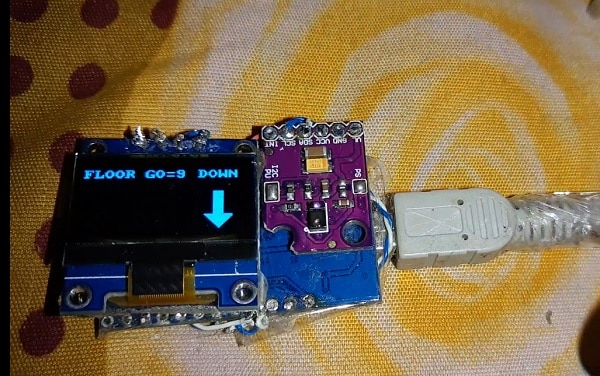
The Contactless Gesture-based Switch Panel for Lifts operates by integrating optical gesture sensing with a microcontroller and visual feedback interface. At the core of the system is the Arduino, which coordinates data communication and controls the lift motor mechanism components based on user input. When a user waves their hand near the APDS9960 gesture sensor, the sensor uses integrated infrared photodiodes to detect directional motion—such as left, right, up, or down—by measuring the reflection of emitted light off the user's hand. The Arduino continuously polls this sensor over a digital communication interface to interpret the specific gesture command. Once a valid gesture is recognized, the microcontroller triggers the appropriate lift motor mechanism components to simulate floor selection or cabin movement. Simultaneously, the system updates the user interface by sending data to an SSD1306 OLED display, which visually renders the current status, selected floor, or system state. Power and signal routing are established using standard connecting wires to link the sensor and display modules to the Arduino board. The software environment relies on specialized libraries, including the U8g2 library for rendering graphics on the OLED screen and the APDS9960 library for decoding motion data into actionable digital signals, creating a seamless, touch-free human-machine interface suitable for modern elevator control systems.
Why Build This
Design hygienic, touch-free control interfaces for public elevators and shared facilities to reduce surface germ transmission.
Implement advanced sensor integration and visual display rendering suitable for undergraduate-level embedded systems portfolios.
Explore practical human-computer interaction (HCI) methodologies using gesture recognition algorithms on microcontroller platforms.
Real-World Application
Elevators and lifts in residential buildings, hotels, hospitals, and public facilities, as well as contactless interfaces for ATMs and vending machines.
Skills You'll Learn
I2C communication protocol
optical sensor interfacing
microcontroller digital I/O handling
graphics library implementation
motor control integration
Safety Precautions
No specific precautions noted for this build — always follow general electronics safety practices.
Frequently Asked Questions
The sensor emits low-power infrared light and measures the amount of light reflected back onto its photodiodes. By tracking how the light reflection shifts across the sensor's multiple zones, the integrated circuitry determines the direction of the hand movement.
The U8g2 library is used to manage and render text and graphics on the SSD1306 OLED display, allowing the system to provide visual feedback to the user regarding their gesture commands.
The project is designed around the Arduino platform and relies on specific Arduino libraries. While other microcontrollers compatible with the Arduino IDE might work, you would need to ensure they support the required communication protocols and libraries.
Gallery
This page is part of Kitkraft's Project Hub — a curated collection of electronics & robotics projects gathered from the maker community to help students and hobbyists discover and learn to build. Kitkraft does not claim authorship of the original project, and makes no representation as to the accuracy, completeness or safety of third-party source material. The summary and "How It Works" explanation above are AI-generated, rewritten with reference to the original tutorial — not a reproduction of it. Full credit and a direct link to the original source are provided above. If you're the original creator and have a concern about how your work is represented here, please contact us and we'll address it promptly.
 0.96 Inch I2C/IIC 4pin OLED Display Module White
Rs. 349.00
 Jumper Wire 10 Pin Male To Male 20cm
Rs. 45.00
 400 Points Mini Solderless Prototype PCB Breadboard High Quality
Rs. 89.00
 MB102 Adjustable Breadboard Power Supply Module (3.3V & 5V) for Arduino & Raspberry Pi
Rs. 139.00
 Jumper Wire 10 Pin Male To Female 20cm
Rs. 45.00


