A smart USB flash storage device secured via fingerprint or password authentication using an Arduino and Bluetooth module, requiring no special PC drivers.
This project is sourced from another site, not written by us — this list is our best match of their components against what we stock, not a verified bill of materials. Always check the original blog (linked above) for the actual parts list before buying.
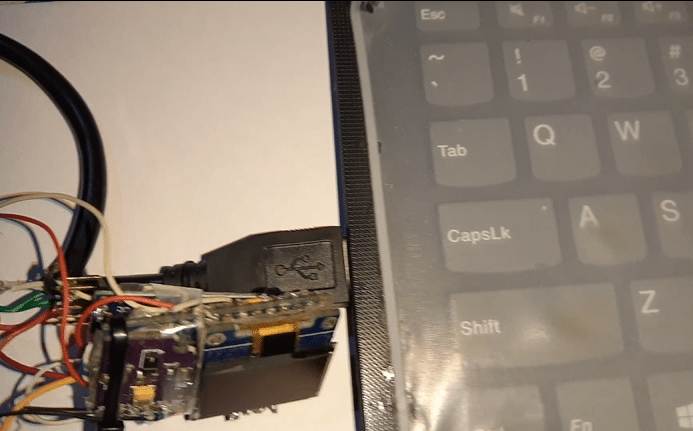
The Finger Print Authentication Flash Storage Device functions as an intelligent hardware gatekeeper placed between a standard USB flash drive and a host system. At the core of the system is an Arduino board, which manages the logical state and communication pathways. A female USB connector is wired to interface directly with the USB flash drive, while the Arduino controls the power and data lines required to bridge the storage device to an external port. Authentication is handled remotely through a wireless link: an HC-05 Bluetooth module pairs with a companion mobile application built using Kodular, MIT App Inventor, or Android Studio. When a user attempts to access the storage, they input a password or trigger a biometric scan on their smartphone. The smartphone app transmits this authorization signal wirelessly to the HC-05 module using serial communication over UART. Upon receiving the correct authentication string, the Arduino activates a switching circuit or relay mechanism to enable data flow through the USB connector, granting access to the files on the flash drive. If authorization fails or no signal is sent, the connection remains restricted, ensuring unauthorized users cannot read or write data to the drive. Because the validation logic is entirely self-contained within the microcontroller and the Bluetooth handshake, the device operates independently of any platform-specific drivers on the host computer.
Why Build This
Develop secure peripheral hardware prototypes for capstone design courses and portfolio demonstrations.
Gain practical experience implementing wireless UART communication protocols using microcontroller-based systems.
Design cross-platform hardware security solutions that bypass the need for proprietary PC driver installations.
Real-World Application
Securely transferring and storing confidential files on standard USB flash drives without relying on platform-specific software or drivers.
Skills You'll Learn
Bluetooth serial communication
Microcontroller peripheral control
Mobile application interface design
Hardware access control logic
UART serial interfacing
Safety Precautions
No specific precautions noted for this build — always follow general electronics safety practices.
Technology Tags
ARDUINO
BLUETOOTH HC-05
USB FLASH DRIVE
FINGERPRINT AUTHENTICATION
KODULAR
MIT APP INVENTOR
ANDROID STUDIO
HARDWARE SECURITY
Frequently Asked Questions
No. Because the authentication and access control are handled externally by the Arduino and Bluetooth module, the computer simply recognizes the setup as a standard USB flash drive once access is granted.
The project is specifically structured around the HC-05 module for simple SPP (Serial Port Profile) communication with Android apps built in Kodular or MIT App Inventor, so substituting other modules may require rewriting the communication logic.
The mobile app connects to the HC-05 module via Bluetooth wireless signals, sending specific character strings over serial communication that the Arduino parses to determine whether to grant access.
Gallery
This page is part of Kitkraft's Project Hub — a curated collection of electronics & robotics projects gathered from the maker community to help students and hobbyists discover and learn to build. Kitkraft does not claim authorship of the original project, and makes no representation as to the accuracy, completeness or safety of third-party source material. The summary and "How It Works" explanation above are AI-generated, rewritten with reference to the original tutorial — not a reproduction of it. Full credit and a direct link to the original source are provided above. If you're the original creator and have a concern about how your work is represented here, please contact us and we'll address it promptly.
 ESP32 WiFi+Bluetooth CP2102 Development Board
Rs. 520.00
 Jumper Wire 10 Pin Male To Male 20cm
Rs. 45.00
 400 Points Mini Solderless Prototype PCB Breadboard High Quality
Rs. 89.00
 MB102 Adjustable Breadboard Power Supply Module (3.3V & 5V) for Arduino & Raspberry Pi
Rs. 139.00
 Jumper Wire 10 Pin Male To Female 20cm
Rs. 45.00


