This project is sourced from another site, not written by us — this list is our best match of their components against what we stock, not a verified bill of materials. Always check the original blog (linked above) for the actual parts list before buying.
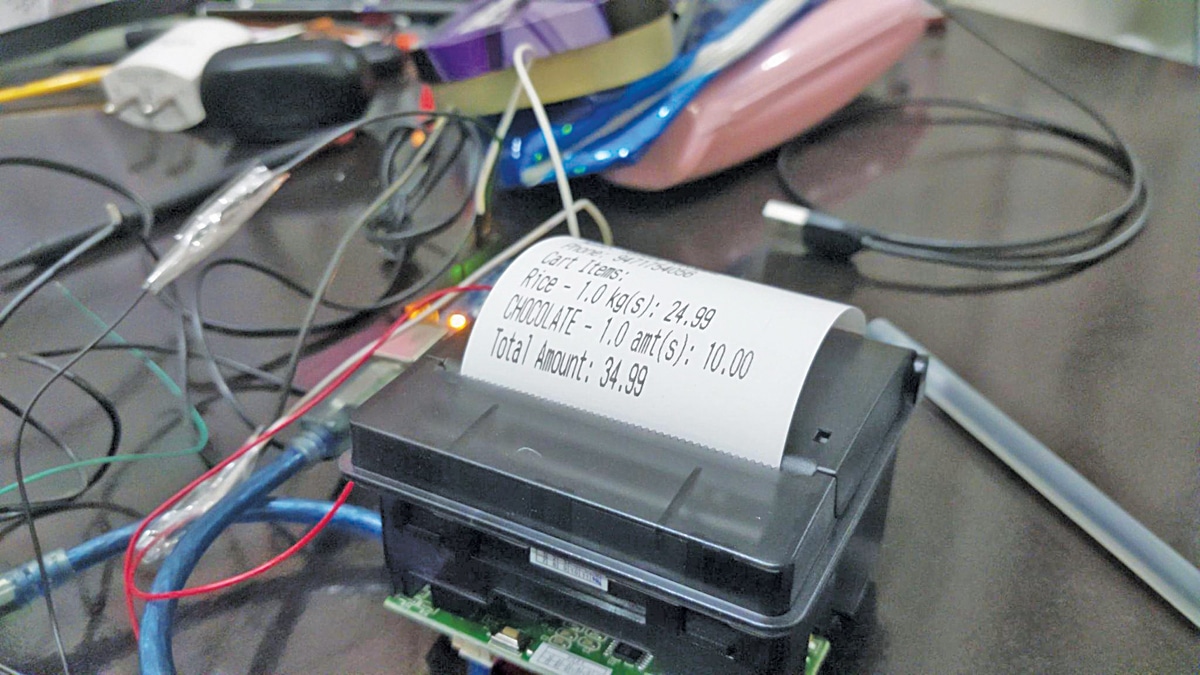
The Shop Billing System operates as an integrated point-of-sale network relying on both software and hardware coordination. At the core, an Arduino Uno board acts as the hardware interface, communicating with a connected thermal printer (model RP203) using a dedicated power supply to ensure stable voltage during high-current printing operations. The workflow begins on the computer side, where a user interacts with a graphical user interface built using Python and the Tkinter library. Within this desktop interface, items, prices, and quantities are entered to calculate total transaction costs. When the bill is finalized, the Python application transmits the receipt data serially to the Arduino board. The Arduino processes these incoming commands and routes the formatted text and graphics signals to the thermal printer. As the thermal printer's internal heating elements selectively heat the specialized thermal paper passing beneath the print head, physical receipts are generated instantly without requiring ink or toner ribbons.
Why Build This
Design and deploy a functional, low-cost point-of-sale (POS) hardware setup suitable for small retail shops and local stores.
Gain practical experience bridging desktop software applications written in Python with physical microcontroller hardware.
Implement automated peripheral hardware control, specifically learning how to format and drive a thermal receipt printer using serial communication.
Real-World Application
Small retail shops, point-of-sale (POS) systems, and local stores looking for a low-cost automated billing and receipt-printing solution.
Skills You'll Learn
Serial communication
GUI development with Python Tkinter
microcontroller interfacing
hardware power management
peripheral device integration
Safety Precautions
No specific precautions noted for this build — always follow general electronics safety practices.
Technology Tags
ARDUINO
PYTHON
THERMAL PRINTER
TKINTER
GUI
RETAIL AUTOMATION
Frequently Asked Questions
You will need Python for the desktop GUI interface and Arduino C/C++ for programming the Arduino Uno microcontroller.
Thermal printers draw significant peak current when their internal heating elements generate a receipt, which can overload the Arduino's onboard voltage regulator if drawn directly from it.
The system is specifically structured around the RP203 thermal printer; using a different model may require modifying the communication protocol and control libraries.
This page is part of Kitkraft's Project Hub — a curated collection of electronics & robotics projects gathered from the maker community to help students and hobbyists discover and learn to build. Kitkraft does not claim authorship of the original project, and makes no representation as to the accuracy, completeness or safety of third-party source material. The summary and "How It Works" explanation above are AI-generated, rewritten with reference to the original tutorial — not a reproduction of it. Full credit and a direct link to the original source are provided above. If you're the original creator and have a concern about how your work is represented here, please contact us and we'll address it promptly.
 Jumper Wire 10 Pin Male To Male 20cm
Rs. 45.00
 MB102 Adjustable Breadboard Power Supply Module (3.3V & 5V) for Arduino & Raspberry Pi
Rs. 139.00
 400 Points Mini Solderless Prototype PCB Breadboard High Quality
Rs. 89.00
 Jumper Wire 10 Pin Male To Female 20cm
Rs. 45.00


