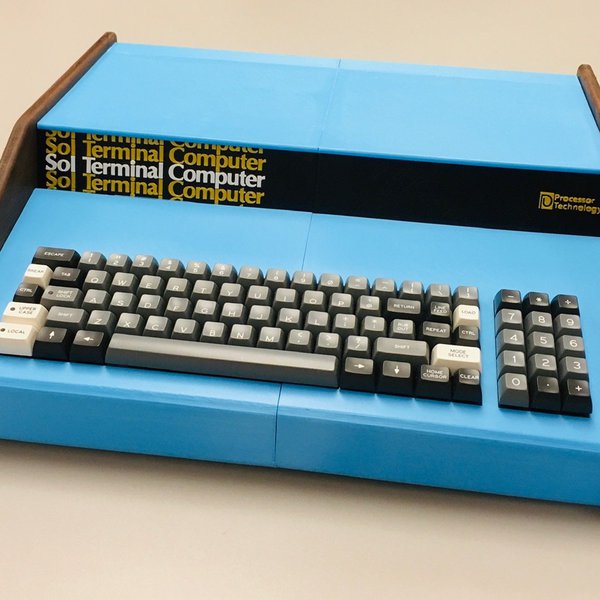
A full-sized replica of the iconic 1976 Sol-20 microcomputer, built using 3D-printed parts, a modern replacement keyboard, and a Raspberry Pi running a custom Python-based Intel 8080 emulator.
This project is sourced from another site, not written by us — this list is our best match of their components against what we stock, not a verified bill of materials. Always check the original blog (linked above) for the actual parts list before buying.
The Sol-20 Reproduction project replicates a classic 1976 microcomputer by combining modern single-board computing, custom hardware fabrication, and software emulation. At the core of the system is a Raspberry Pi 4 Model B running Python 3 and PyGame. Instead of original vintage silicon, a custom Python-based Intel 8080 CPU emulator executes within the Raspberry Pi operating environment, accurately processing machine instructions just like the historical microprocessor. To recreate the authentic software experience, the system loads the original SOLOS ROM alongside classic languages like MS-BASIC and BASIC-5. User input is handled via a Unified Retro Keyboard kit featuring mechanical Cherry switches, wired directly into the system to capture keystrokes. For output, the Raspberry Pi connects to an external monitor or display to render text and graphics. Structurally, the electronic components are housed inside an enclosure constructed from custom 3D-printed case parts and aesthetic wood panels, mimicking the physical form factor of the historic Sol-20 terminal. Wiring for the serial port facilitates communication and debugging. Together, this blend of modern additive manufacturing, mechanical keyboard switches, and software emulation creates a fully interactive, historically faithful computing terminal driven by a hidden Linux-based single-board computer.
Why Build This
Examine how classic 8-bit mainframe and microcomputer architectures function by running vintage ROMs and emulated Intel 8080 instruction sets on modern hardware.
Gain hands-on experience integrating physical prototyping techniques, such as 3D printing and custom woodwork, with modern single-board computers.
Develop proficiency in retro-computing software layers, including custom CPU emulation in Python and interfacing modern keyboards with legacy operating environments.
Real-World Application
Preserving computing history, retro-gaming emulation, and demonstrating how classic mainframe/microcomputer architectures can be faithfully reproduced using modern single-board computers and 3D printing.
Skills You'll Learn
CPU instruction set emulation
single-board computer configuration
retro-computing software integration
serial port wiring
custom enclosure fabrication
mechanical keyboard assembly
Safety Precautions
No specific precautions noted for this build — always follow general electronics safety practices.
Technology Tags
PYTHON
PYGAME
3D PRINTING
EMULATION
INTEL 8080
S-100 BUS
RETROCOMPUTING
CHERRY MX
Frequently Asked Questions
No, the physical CPU is not required. The project uses a custom Python-based Intel 8080 emulator running on the Raspberry Pi 4 to simulate the processor entirely in software.
The Unified Retro Keyboard kit uses modern Cherry switches and connects via appropriate wiring and interfaces compatible with the Raspberry Pi to capture and translate user input.
Yes, the system is designed to run the SOLOS ROM along with MS-BASIC and BASIC-5 through the emulation layer, providing an authentic software experience on a modern display.
Gallery
This page is part of Kitkraft's Project Hub — a curated collection of electronics & robotics projects gathered from the maker community to help students and hobbyists discover and learn to build. Kitkraft does not claim authorship of the original project, and makes no representation as to the accuracy, completeness or safety of third-party source material. The summary and "How It Works" explanation above are AI-generated, rewritten with reference to the original tutorial — not a reproduction of it. Full credit and a direct link to the original source are provided above. If you're the original creator and have a concern about how your work is represented here, please contact us and we'll address it promptly.
 Raspberry Pi 3 - Model B+ 1.4Ghz 64-bit quad-core Processor with 1 GB Ram (Original)
Rs. 9,810.00
 400 Points Mini Solderless Prototype PCB Breadboard High Quality
Rs. 89.00
 MB102 Adjustable Breadboard Power Supply Module (3.3V & 5V) for Arduino & Raspberry Pi
Rs. 139.00
 Jumper Wire 10 Pin Male To Male 20cm
Rs. 45.00
 Jumper Wire 10 Pin Male To Female 20cm
Rs. 45.00


