Automatic Netflix Login For Your Smart TV & Fire TV Stick
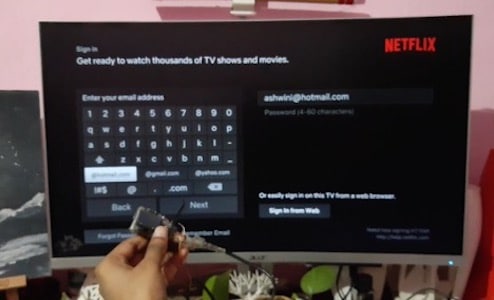
This project uses an Arduino Pro Micro configured as a USB HID device to automatically enter login credentials for Netflix on a smart TV or Fire TV Stick.
This project is sourced from another site, not written by us — this list is our best match of their components against what we stock, not a verified bill of materials. Always check the original blog (linked above) for the actual parts list before buying.
This project transforms an Arduino Pro Micro into a Human Interface Device (HID) capable of interacting with a Smart TV or Amazon Fire TV Stick via a USB connection cable. Because the Arduino Pro Micro features an ATmega32U4 microcontroller with native USB communication capabilities, it can be programmed using the Arduino IDE to emulate a standard USB computer keyboard. When you plug the programmed Arduino Pro Micro into a compatible USB port on your smart TV or streaming stick, the microcontroller executes a pre-compiled sequence of instructions. Rather than processing physical button presses from a standard remote control, the system automatically simulates a precise series of keyboard keystrokes and timing delays. These emulated keystrokes navigate the on-screen user interface, select the appropriate input fields, and sequentially type out your login credentials. By handling the navigation and text entry routines automatically, the hardware bridges the gap between traditional microcontroller programming and consumer electronics automation, turning raw lines of code into automated physical inputs.
Why Build This
Automate repetitive credential entry on digital signage or streaming devices where typing with a standard infrared remote is tedious.
Gain practical experience implementing native USB HID device emulation using an ATmega32U4 microcontroller.
Understand how to sequence automated keystrokes and timing delays to reliably navigate graphical user interfaces.
Real-World Application
Automating tedious login procedures on smart TVs, streaming sticks, and digital signage devices where typing with a standard remote is impractical.
Skills You'll Learn
USB HID protocol implementation
keyboard emulation
microcontroller programming
automated user interface navigation
timing and delay management
Safety Precautions
No specific precautions noted for this build — always follow general electronics safety practices.
Technology Tags
ARDUINO
USB HID
AUTOMATION
SMART TV
FIRE TV STICK
EMULATED KEYBOARD
Frequently Asked Questions
No, a standard Arduino Uno lacks the native USB capabilities of the ATmega32U4 chip found on the Pro Micro, meaning it cannot easily emulate a USB keyboard to send keystrokes to your TV.
Yes, standard USB ports on smart TVs and streaming sticks provide sufficient power for a low-power microcontroller like the Arduino Pro Micro.
You will need to modify the character string arrays inside your Arduino IDE sketch and re-flash the compiled code onto the Arduino Pro Micro.
Gallery
This page is part of Kitkraft's Project Hub — a curated collection of electronics & robotics projects gathered from the maker community to help students and hobbyists discover and learn to build. Kitkraft does not claim authorship of the original project, and makes no representation as to the accuracy, completeness or safety of third-party source material. The summary and "How It Works" explanation above are AI-generated, rewritten with reference to the original tutorial — not a reproduction of it. Full credit and a direct link to the original source are provided above. If you're the original creator and have a concern about how your work is represented here, please contact us and we'll address it promptly.
 Jumper Wire 10 Pin Male To Male 20cm
Rs. 45.00
 400 Points Mini Solderless Prototype PCB Breadboard High Quality
Rs. 89.00
 MB102 Adjustable Breadboard Power Supply Module (3.3V & 5V) for Arduino & Raspberry Pi
Rs. 139.00
 Jumper Wire 10 Pin Male To Female 20cm
Rs. 45.00


