Biometric Attendance System with Google Sheet Integration
Build an IoT-enabled biometric attendance system using an ESP32 and an R307 fingerprint sensor that automatically logs attendance to an SQLite database and syncs records to Google Sheets.
This project is sourced from another site, not written by us — this list is our best match of their components against what we stock, not a verified bill of materials. Always check the original blog (linked above) for the actual parts list before buying.
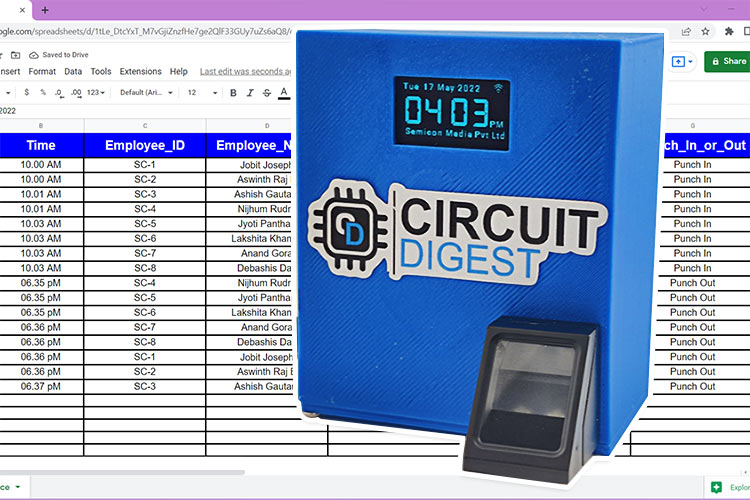
The Biometric Attendance System operates by combining local biometric authentication with real-time cloud synchronization using an ESP32 development board as the central processing unit. When a user presses their finger onto the R307 optical fingerprint module, the sensor captures the fingerprint image, extracts unique minutiae features, and compares them against its internal database or sends them to the microcontroller for matching. Once a valid fingerprint is recognized, the system queries the DS1307 Real-Time Clock (RTC) module via the I2C protocol to obtain the exact timestamp of the scan. This attendance event, containing the user ID and time, is then displayed locally on a 128x64 SSD1306 OLED screen for immediate user feedback. Simultaneously, the ESP32 connects to a local Wi-Fi network to log the record into a local SQLite database running on the board or to transmit the data securely via HTTPS to a custom Google Apps Script endpoint. This script parses the incoming payload and appends a new row directly into a cloud-hosted Google Sheet, ensuring both local redundancy and centralized remote record-keeping. The entire circuit is mounted on a durable perfboard and powered reliably by an external 5V power supply, with proper voltage regulation ensuring the ESP32, fingerprint module, RTC, and OLED display receive their required operating potentials.
Why Build This
Design and deploy an end-to-end IoT edge device that bridges physical biometric hardware with cloud infrastructure for automated data logging.
Gain practical undergraduate-level engineering experience in implementing secure HTTP requests and API integrations using the Arduino IDE.
Build a scalable, tamper-proof attendance tracking solution suitable for deployment in university laboratories, student organizations, or small enterprises.
Real-World Application
Used in offices, schools, and small-to-medium industries for automated, reliable, and tamper-proof attendance monitoring and cloud-based record keeping.
Skills You'll Learn
I2C communication protocol
Biometric sensor integration
Real-Time Clock (RTC) synchronization
Cloud API integration with Google Sheets
Local SQLite database management on microcontrollers
ESP32 filesystem handling
Wi-Fi networking in Arduino
Safety Precautions
Ensure correct voltage connections (3.3V and 5V pins appropriately routed) to prevent damage to sensitive modules like the OLED display and fingerprint sensor.
Technology Tags
ESP32
FINGERPRINT SCANNER
R307
OLED DISPLAY
DS1307 RTC
GOOGLE SHEETS
SQLITE
HTML
CSS
JAVASCRIPT
WEB SERVER
WI-FI
Frequently Asked Questions
While the ESP32 can be programmed via USB, peripherals like the R307 fingerprint module and multiple I2C devices can draw significant peak current during scanning operations, making a dedicated 5V power supply essential for stable system operation and preventing unexpected reboots.
The DS1307 RTC module includes a battery backup (typically a coin cell), allowing it to maintain accurate date and time tracking independently even when the main 5V power supply is turned off or Wi-Fi connectivity is unavailable.
Yes, because the system incorporates local data handling via the SQLite library for ESP32, attendance records can be stored locally on the board during network outages and later synced to Google Sheets once the Wi-Fi connection is restored.
Gallery
This page is part of Kitkraft's Project Hub — a curated collection of electronics & robotics projects gathered from the maker community to help students and hobbyists discover and learn to build. Kitkraft does not claim authorship of the original project, and makes no representation as to the accuracy, completeness or safety of third-party source material. The summary and "How It Works" explanation above are AI-generated, rewritten with reference to the original tutorial — not a reproduction of it. Full credit and a direct link to the original source are provided above. If you're the original creator and have a concern about how your work is represented here, please contact us and we'll address it promptly.
 ESP32 WiFi+Bluetooth CP2102 Development Board
Rs. 520.00
 AS608 Optical fingerprint reader module sensor
Rs. 1,500.00
 0.96 Inch I2C/IIC 4pin OLED Display Module White
Rs. 349.00
 Jumper Wire 10 Pin Male To Male 20cm
Rs. 45.00
 MB102 Adjustable Breadboard Power Supply Module (3.3V & 5V) for Arduino & Raspberry Pi
Rs. 139.00
 400 Points Mini Solderless Prototype PCB Breadboard High Quality
Rs. 89.00
 Jumper Wire 10 Pin Male To Female 20cm
Rs. 45.00


